
Television is no longer about cables and dishes. Today, a single app can replace your entire TV setup and give you access to thousands of channels in one place. Sky Glass App has become one of the most searched streaming solutions in 2026, but most people do not know what it actually is. This guide breaks it all down in simple words.
What Is Sky Glass App?
Sky Glass App is a collective term used for multiple applications connected to the Sky Glass brand. Sky Glass itself is a smart TV created by Sky in the UK. It comes with Sky’s entertainment service built directly into the screen, removing the need for a satellite dish.
Beyond the television itself, Sky developed companion apps to extend the experience. These apps allow users to control their TV, stream content on mobile devices, or access entertainment on different screens.
Additionally, other independent developers have used the Sky Glass name for their own products, including an IPTV service and a flight tracking tool. Each app serves a completely different function, which often causes confusion among new users.
Who Is This App For?
Sky Glass apps serve very different groups of people. Sky Glass TV owners use the remote app to control their television from a smartphone. People who travel frequently use Sky Go to stay connected to their favourite channels on any screen.
IPTV users who want affordable streaming without a cable subscription rely on the Sky Glass IPTV app. Film and video production professionals use the Skyglass virtual production app to create high-quality visual content on an iPad.
Aviation enthusiasts and pilots use the SkyGlass flight tracker to monitor real-time aircraft movement. In short, this app name covers everyone from casual TV viewers to creative professionals and aviation fans.
Types of Sky Glass App
Sky Remote App
The Sky Remote App turns a smartphone or tablet into a full TV remote. It connects to a Sky Glass TV or Sky Stream device over Wi-Fi and gives users complete control from their phone. It supports voice commands, channel switching, and playback management on both iOS and Android.
Sky Go App
Sky Go lets Sky subscribers watch live TV and on-demand content outside their home. It works on phones, tablets, laptops, and gaming consoles and comes free with every Sky Glass subscription. A major redesign is planned for late 2026 with deeper integration across all Sky devices.
Sky Glass IPTV App
Sky Glass IPTV is a third-party streaming application that delivers live television, movies, and sports over the internet. It runs on Firestick, Android TV, Smart TVs, iPhones, and Windows computers. The 2026 update improved loading speed, reduced buffering, and delivered a cleaner and more responsive interface.
Skyglass Virtual Production App
Skyglass by AVIAR Labs is a professional tool built for filmmakers and video production teams. It uses cloud-based Unreal Engine servers to create realistic 3D virtual environments directly on an iPad or iPhone. Everything runs through the cloud, keeping the setup lightweight without any expensive on-site hardware.
SkyGlass Flight Tracker App
SkyGlass by AVIAR Labs offers a real-time 3D flight tracking application available on Android. It displays live aircraft positions, flight paths, altitude, and speed in an interactive 3D environment. The app is free on Google Play with advanced features available through a paid subscription.
Sky Glass IPTV App In Detail
How Does It Work?
Sky Glass IPTV streams television channels through a broadband internet connection directly to the app on any supported device. After purchasing a subscription, users receive login credentials and access thousands of live channels, movies, and series instantly. The app organises all content into clear categories, making browsing fast and simple.
Compatible Devices
Sky Glass IPTV supports Android phones, Android TV boxes, Smart TVs, Amazon Firestick, iPhone, iPad, MacBook, Apple TV, and Windows computers. Samsung and LG Smart TV owners access the service through third-party apps available in their device’s app store. The service also works on Roku and MAG box devices, giving users wide flexibility.
Required Internet Speed
For standard HD streaming, a minimum speed of 10 Mbps keeps the picture clear and stable. For 4K or 8K content, users need at least 25 to 40 Mbps for a smooth experience. Connecting the device directly to the router with an ethernet cable reduces buffering significantly compared to Wi-Fi.
Sky Glass App Features
The Sky Glass ecosystem offers voice control, allowing users to find shows, switch channels, and manage playback by simply speaking. This hands-free experience makes navigation fast and effortless for everyone.
Content quality reaches up to 8K resolution depending on the service and device in use. Users access thousands of live channels alongside a large library of on-demand movies and TV series all in one place.
Multi-device support lets users start watching on a TV and continue on a phone without losing their place. Automatic updates keep the app running at its best without requiring any manual action from the user.
Is Sky Glass App Safe to Use?
The official Sky Remote app and Sky Go app are completely safe products from a well-established broadcaster. Both apps are available through official app stores and receive regular security updates from Sky directly.
The Skyglass virtual production and flight tracking apps from AVIAR Labs are also legitimate products. They use encrypted connections and require authenticated accounts, keeping user data protected during every session.
Third-party IPTV services carry more responsibility for the user. Choosing a reputable provider and using a VPN for added privacy reduces any potential risk and ensures a more secure streaming experience overall.
Benefits of Sky Glass App
No Dish or Cable Required
Every app within the Sky Glass ecosystem works entirely over the internet, removing the need for any satellite dish or cable connection. This makes setup simpler and far more affordable for most households, especially renters who cannot modify their property.
Works on Every Device
The Sky Glass ecosystem covers almost every popular consumer device including phones, Smart TVs, Firestick, laptops, and tablets. Families can watch different content on different devices simultaneously without any conflict or extra cost.
Regular Updates
All apps receive consistent automatic updates that improve performance, fix issues, and strengthen security over time. The 2026 updates focused on faster loading, better buffering management, and cleaner interfaces across all supported devices.
Everything in One Place
Sky Glass combines live TV, on-demand content, sports, movies, and streaming apps into one unified interface. Voice search finds content across all connected services at once, saving time and removing the need to switch between multiple platforms.
Sky Glass App Pros and Cons
Our team personally tested Sky Glass App across multiple devices and shared this honest breakdown based on real experience.
Pros
Works without a dish or cable, keeping setup simple and affordable for most households. Supports a very wide range of devices from smartphones to Smart TVs and streaming sticks.
Delivers high-quality content up to 8K resolution on supported devices and services. Voice control makes the experience fast and accessible for users of all ages and abilities.
Cons
The shared name across multiple unrelated apps creates confusion for users searching for a specific product. Official Sky apps require an active subscription, which adds an ongoing monthly or yearly cost.
Third-party IPTV services are not available on official app stores and need manual installation steps. Streaming quality depends entirely on internet speed, which varies significantly by location and provider.
Common Problems and Solutions
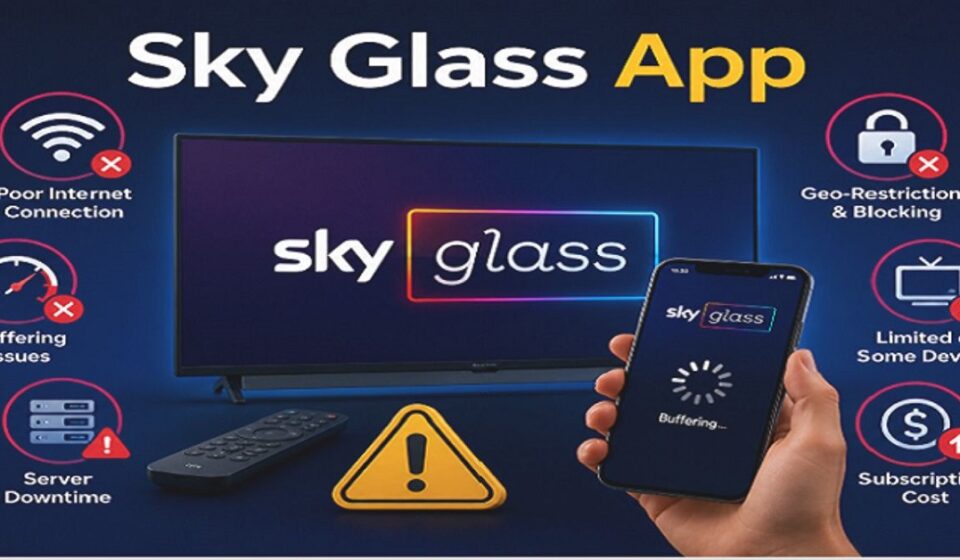
Buffering is the most common complaint among streaming users. The fastest solution is checking internet speed and switching from Wi-Fi to a wired ethernet connection. Selecting a lower stream quality inside the app also helps during network congestion.
App crashes usually happen when the installed version is outdated. Updating to the latest version resolves most crashes right away. Restarting the device clears temporary errors and brings performance back to normal quickly.
Login issues often appear after a password change or subscription renewal. Clearing the app cache and re-entering login credentials sorts out most access problems. Contacting the service provider directly resolves anything that a basic restart cannot fix.
Conclusion
Sky Glass App is a powerful name that covers multiple tools built for different people and different needs. Whether you want to control your TV, stream live channels, create virtual film sets, or track live aircraft, there is a version of this app built exactly for you. Pick the right one and transform the way you watch, work, and explore.
Frequently Asked Questions
What exactly is the Sky Glass App?
It is a name used for several different apps including a TV remote, IPTV player, virtual production tool, and flight tracker.
Is Sky Glass App free to use?
Some versions are free but most require an active subscription or yearly payment to access full content.
Can I use Sky Glass App without a satellite dish?
Yes, every version works entirely over the internet with no dish or cable required.
Which devices support Sky Glass App?
It supports Android, iPhone, iPad, Firestick, Smart TVs, MacBook, Windows, Apple TV, and Roku devices.
What internet speed do I need for smooth streaming?
A minimum of 10 Mbps for HD and at least 25 to 40 Mbps for 4K or 8K content.
Is Sky Glass App safe and legal to use?
Official Sky apps are fully safe and legal while third-party IPTV services depend on the provider you choose.
What should I do if Sky Glass App is buffering or not working?
Check your internet speed, update the app, restart your device, or contact your service provider directly.
Disclaimer:
This article is written for informational purposes only. We do not promote any specific service, subscription, or third-party provider mentioned in this content.
Read more topics on :Instamagazine.co.uk