
Hearing aid users often struggle to change their settings in real time. Easy Line Remote solves this problem directly from a smartphone. This guide explains what the app does, how it functions, and who should use it.
What is Easy Line Remote App?
Easy Line Remote is a mobile app that controls compatible hearing aids. It works on both Android and iOS devices. The app connects to hearing aids through Bluetooth wireless technology. Users can manage sound settings without touching the hearing aid itself. It is available for free on the Google Play Store and Apple App Store.
Who Developed Easy Line Remote App?
The app is developed by Sonova AG, a global hearing care company. Sonova also owns other well-known hearing aid brands. Easy Line Remote supports hearing aids sold under names like Kirkland Signature and Phonak. The company regularly updates the app to fix bugs and improve performance.
Is Easy Line Remote a Medical Device?
Yes, Easy Line Remote is classified as a medical device. This classification applies because it directly controls hearing aid functions. The app falls under medical device regulations in the regions where it operates. This classification separates it from ordinary lifestyle or entertainment apps.
Key Features of Easy Line Remote App
The app offers several functions built around hearing control and health tracking. Each feature targets a specific part of the user experience. Our team has tested this app firsthand, and the features below reflect what we found most useful during that experience.
Hearing Controls
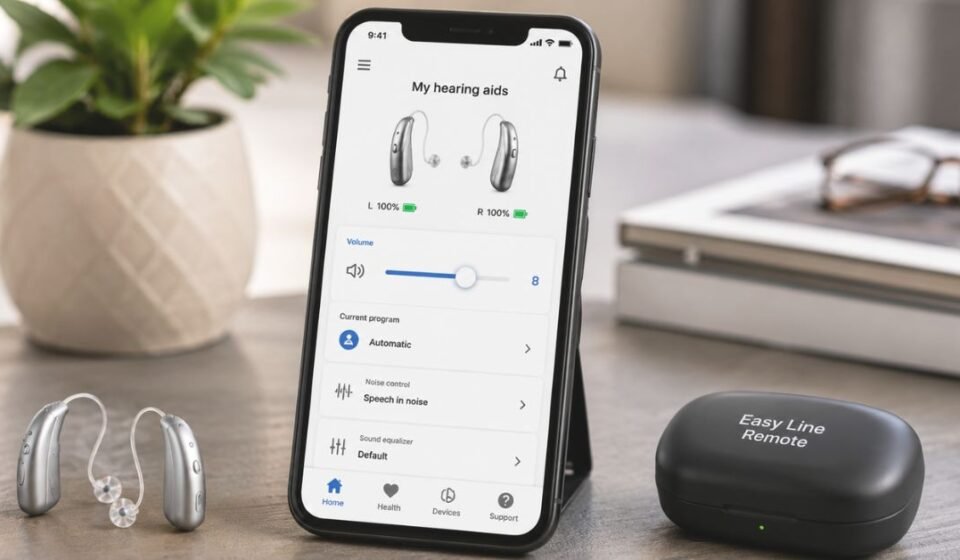
Users can change volume directly from their phone screen. Noise reduction settings help reduce background sound in loud places. Microphone directionality lets users focus on sound coming from a specific direction, such as a person speaking in front of them.
Custom Equalizer
The equalizer lets users fine-tune sound pitch. Presets like comfort, clarity, and softer are available for quick changes. Manual sliders for bass, middle, and treble allow more detailed control over tone.
Pre-Defined Listening Programs
The app includes ready-made programs for different environments. A restaurant setting differs from a quiet room or a TV-watching session. Users simply pick the matching program instead of changing each setting manually.
Remote Support
This feature connects users to a professional through a live video call. The professional can update hearing aid settings during the session. This function works by appointment only, not on demand.
Health & Activity Tracking
Available on select models like KS 10.0 and Brio 5, this feature tracks steps and wearing time. Activity levels and optional goals are also included. This data helps users understand their daily hearing aid usage patterns.
Touch Control Configuration
Users can set up touch gestures on their hearing aids through the app. This allows quick actions like answering calls or changing volume with a simple tap.
Battery Status & Cleaning Reminders
The app displays real-time battery levels for hearing aids and accessories. It also sends reminders to clean the devices regularly. This helps maintain hearing aid performance over time.
Compatible Hearing Aids List
Easy Line Remote only works with specific hearing aid models. Compatibility is limited to devices made by Sonova and its partner brands. The table below lists all supported models currently confirmed.
| Hearing Aid Model |
| Sonite Rise |
| Sonite R |
| KS 10.0 |
| KS 9.0 |
| KS 9.0 T |
| Brio 5 |
| Brio 4 |
| Brio 3 |
| Phonak CROS P (KS 10.0) |
Device & OS Requirements
The app has different requirements for Android and iOS users. Meeting these requirements is necessary before pairing hearing aids.
| Platform | Requirement |
| iOS | iPhone 6s or newer, iOS 14.0 or later |
| Android | Android 7.0 or newer, Bluetooth 4.2 support |
| Bluetooth | Bluetooth Low Energy (BT-LE) capability required |
Easy Line Remote vs Easy Line Pro — What’s the Difference?
These two apps often get confused because of similar names. However, they serve completely different users. Easy Line Remote is built for hearing aid wearers who want direct control over their devices. Easy Line Pro is built for clinical use. It allows diagnostics and troubleshooting of hearing aids in a professional setting. A regular user should never need Easy Line Pro for daily use.
How Easy Line Remote Works
Setting up the app follows a simple sequence of steps. Below is the general process for first-time users.
- Enable Bluetooth on the smartphone
- Restart the hearing aids to enter pairing mode
- Open the app and let it search for nearby hearing aids
- Confirm the pairing request for each device
- Select a listening program or adjust controls once connected
- Save preferred settings for future use
User Ratings & Reviews Analysis
Easy Line Remote holds strong ratings on both major app stores. This reflects general user satisfaction with its performance.
| Platform | Rating | Number of Reviews |
| Google Play | 4.3 out of 5 | 4,953 |
| Apple App Store | 4.3 out of 5 | 16,995 |
These numbers come directly from official store listings and are updated periodically by each platform.
Easy Line Remote App Update History & Version Changes
Sonova updates the app periodically to improve stability. Past updates have included interface changes and renamed settings. One notable update introduced a refreshed display and renamed the standard automatic setting to “Automatic Premium.” Recent updates mostly focus on bug fixes and performance improvements rather than major redesigns.
Is Easy Line Remote App Safe & Secure?
The app collects specific data related to hearing aid performance and connection status. This includes device pairing information and technical logs for troubleshooting. Sonova states this data helps with post-market surveillance to keep the app functioning correctly. Users can also choose to share health data, which requires creating an account and logging in.
Frequently Asked Questions
Can I control my hearing aid from my phone?
Yes, Easy Line Remote allows direct control of compatible hearing aids from a smartphone. This includes volume, programs, and equalizer settings.
What is Easy Line Remote used for?
It helps users manage hearing aid settings and monitor related health data. It also connects them with a professional remotely when needed.
Does Easy Line Remote work without internet?
Basic hearing aid controls work through Bluetooth without internet. However, the Remote Support feature requires an internet connection for video calls.
Can Easy Line Remote replace a visit to an audiologist?
No, the app supports remote adjustments but does not fully replace in-person visits. Certain fittings and diagnostics still require an office visit.
Final Verdict
Easy Line Remote gives hearing aid users practical control over their devices through a smartphone. Its combination of hearing controls, health tracking, and remote support makes it a useful daily tool. The app works only with specific Sonova-related hearing aids, so compatibility should be checked beforehand. Overall, it serves as a reliable companion app for anyone using supported hearing aid models.
Disclaimer:
This article is for informational purposes only. Always consult a qualified hearing-care professional for hearing or device-related advice.
Read more topics on :Instamagazine.co.uk