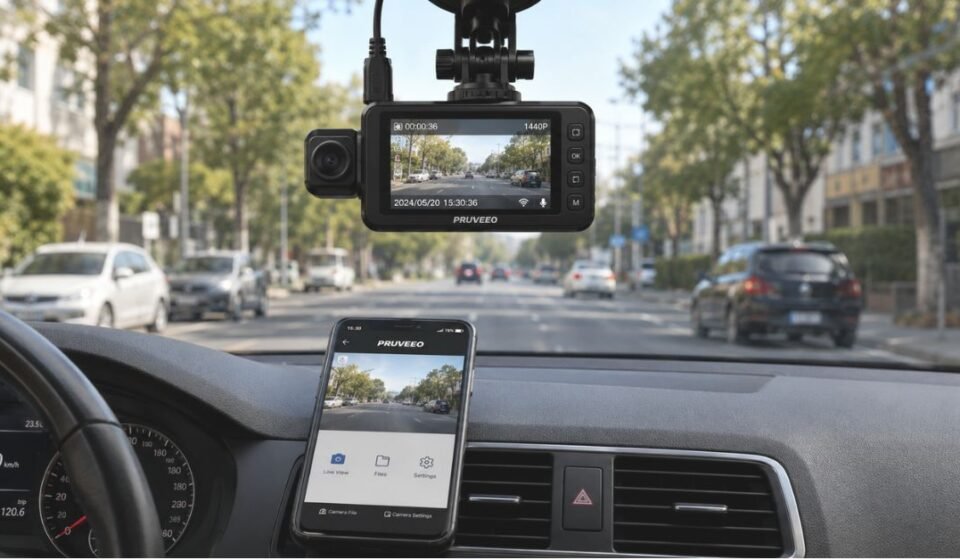

What Is the Pruveeo Dash Cam App?
The Pruveeo Dash Cam App connects your smartphone directly to your dash camera. It lets you view live footage, manage recordings, and control camera settings from your phone. Unlike apps that rely only on cloud uploads, this app uses a direct local connection for faster, more private access.
Key Features of Pruveeo Dash Cam App
The app is built around simple, practical tools that make daily use easy. Each feature focuses on giving drivers full control without extra hardware.
Live Preview & Remote Monitoring
You can watch your dash cam’s live feed on your phone screen. This helps you check your surroundings before you even start driving.
Video & Photo Album Management
Saved clips and snapshots appear in one organized album. You can download or delete files in bulk, saving time when clearing storage.
Camera Settings Customization
The app allows you to adjust recording preferences directly from your phone. You do not need to touch the physical buttons on the camera.
Multi-Lens Switching Support
For multi-channel dash cams, the app lets you switch between front, rear, and side views. This gives a complete picture of your vehicle’s surroundings in one app.
How Pruveeo App Enhances Parking Security
When hardwired, Pruveeo dash cams can monitor your vehicle even while parked. The camera can detect impacts or record in time-lapse mode during this period.
The app lets you check this footage remotely without walking back to your car. This adds a layer of convenience to standard parking protection.
GPS Tracking & Route Playback Explained
Some Pruveeo dash cam models include built-in GPS to log speed, location, and route data. This information is stored alongside your video files on the memory card.
To view this data, you need to remove the SD card and use it with a computer. Pruveeo offers a dedicated GPS Video Player tool that syncs the route data with your recorded video.
Compatible Pruveeo Dash Cam Models
The app is designed to work across several models in the Pruveeo lineup, though exact compatibility can vary by app version.
| Model | App Support |
| D30 | Yes |
| D30H | Yes |
| D90-4CH | Yes |
| D90-4CH-MINI | Yes |
Always check your specific model’s manual to confirm full app compatibility before relying on any feature.
Pruveeo App vs Other Dash Cam Apps
Dash cam apps generally differ in how they connect and what they offer. Here is how the Pruveeo app’s approach compares on a general level.
| Factor | Pruveeo App | Typical Competitor Apps |
| Connection Type | Direct local Wi-Fi | Often Bluetooth or cloud-based |
| Setup Steps | App download + Wi-Fi pairing | Varies widely by brand |
| File Management | Bulk download/delete album | Often limited to single-file actions |
| GPS Playback | Requires separate desktop software | Sometimes built into the app itself |
This local Wi-Fi approach means you do not always need mobile data to access your footage nearby.
Common Issues Users Face and How the App Handles Them
Like most dash cam apps, a few common hiccups can occur during daily use. Knowing what causes them helps you fix problems faster.
Connection/Sync Drops
Distance from the dash cam or interference from other Wi-Fi networks can cause disconnects. Staying within close range usually resolves this.
App Not Detecting Camera
This often happens when the phone’s mobile data or Bluetooth is still active. Turning both off before connecting usually solves the issue.
Storage or Playback Glitches
A full or corrupted SD card can cause playback errors within the album. Formatting the card regularly helps prevent this.
Battery & Storage Management Through the App
The app lets you monitor how much storage space your recordings are using. Bulk delete options in the album help you clear space quickly.
For battery-related settings, most control happens on the camera itself rather than the app. Still, checking your footage regularly through the app helps you manage card space before it runs out.
Tips to Get the Most Out of the Pruveeo App
A few small habits can improve your experience with the app significantly. Our team has personally used this app, and these tips come from their own hands-on experience and advice.
- Turn off mobile data and Bluetooth before connecting to avoid interference.
- Format your SD card periodically to prevent storage errors.
- Keep the app updated to maintain stable connections.
- Download important clips promptly, since local Wi-Fi range is limited.
- Check your dash cam’s manual for model-specific Wi-Fi steps.
Is the Pruveeo Dash Cam App Worth Using?
Weighing the app’s strengths against its limitations helps you decide if it fits your needs.
Pros
- Simple local Wi-Fi connection without constant internet use.
- Clean interface for viewing and managing footage.
- Useful bulk file management tools.
- Supports multiple camera models and multi-lens views.
Cons
- GPS playback requires extra desktop software.
- Wi-Fi range is limited to close proximity.
- Some settings still depend on the physical camera controls.
Conclusion
The Pruveeo Dash Cam App offers a practical way to manage your dash cam without complicated setup. Its local Wi-Fi design keeps things private and simple for everyday drivers.
While it has minor limitations like separate GPS software, its core features cover most driver needs well. For anyone using a compatible Pruveeo model, the app is a useful companion tool.
FAQs
Does the Pruveeo app need mobile internet to work?
No, it connects directly through the dash cam’s own local Wi-Fi network.
Can I view GPS route data inside the app?
No, GPS data needs a separate desktop tool using the SD card.
What models support the app?
Models like the D30, D30H, D90-4CH, and D90-4CH-MINI are supported.
Why does my phone fail to detect the camera?
This is usually caused by active mobile data or Bluetooth interference.
What does “Device Online” or “Device Offline” mean in the app?
It shows whether your phone is currently connected to the dash cam’s Wi-Fi signal.
Can I switch between multiple camera views in the app?
Yes, multi-channel models let you switch between front, rear, and side views.
Disclaimer:
The details shared here are based on publicly available sources and general use cases. Actual app performance may vary depending on your device and camera model.
Read more topics on :Instamagazine.co.uk