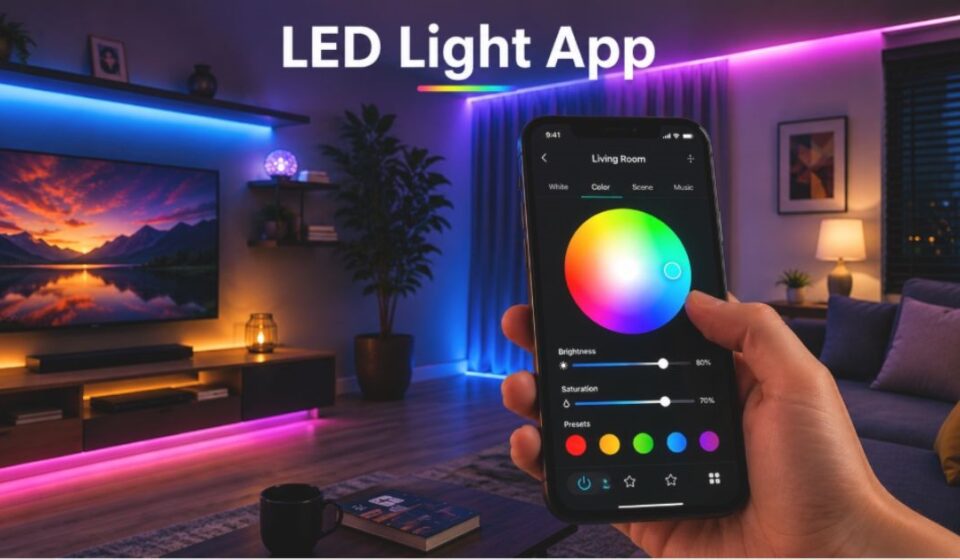

Smart lighting is no longer a luxury; it has become a common part of modern homes and cars. A single tap on a screen can now change the mood of an entire room, something a traditional switch could never do. This guide walks through everything worth knowing about this type of tool, from how it functions to where it fits into daily life.
What Is an LED Light App?
At its core, this is a mobile tool that links a smartphone to smart LED devices. Once connected, it becomes the bridge between a phone and a bulb, strip, or fixture. From here, the same technology extends into how that connection actually happens.
How Does an LED Light App Work?
The connection relies on a wireless or infrared signal sent from the phone to the device. Once linked, commands travel instantly, so a color change or brightness shift happens in real time. The exact method used depends on the hardware being controlled.
Bluetooth Connectivity
Bluetooth links the phone directly to nearby lights without needing internet access. It suits smaller setups like one room or a car interior. Setup is quick, though the signal range stays limited.
WiFi Connectivity
WiFi routes the connection through a home network instead of a direct link. This suits larger spaces with multiple fixtures spread across rooms. It also allows remote access even when the user is away from home.
Infrared (IR) Connectivity
IR relies on a phone’s built-in sensor, working much like a classic remote. It only functions when pointed directly at the device. Many newer smartphones no longer include this hardware.
Key Features of an LED Light App
Beyond basic connectivity, several tools make daily lighting management far more practical.
Color and Brightness Control
A wide color range and adjustable intensity let users match lighting to any mood. Small changes here can shift how an entire space feels.
Preset Scenes and Themes
Ready-made lighting themes cover occasions like parties or quiet evenings. Custom scenes can also be saved for repeated use.
Music Sync
Patterns shift automatically based on nearby audio. This adds movement and energy to gatherings without manual input.
Scheduling and Automation
Fixtures can switch on or off at set times without any manual action. This convenience often reduces wasted electricity too.
Voice Assistant Integration
Pairing with Alexa or Google Assistant allows hands-free operation. A simple spoken command replaces the need to open the phone at all.
Multi-Device Management
Several fixtures across different rooms can often be managed from one dashboard. This turns a scattered setup into a single, organized system.
Types of LED Light Apps
Not every tool in this category serves the same purpose. Four broad categories cover most of what is available today.
| Type | Description |
| Universal Tools | Manage fixtures from multiple brands through one interface |
| Brand-Specific Tools | Work only with a single manufacturer’s product line |
| IR Remote Tools | Rely on a phone’s infrared sensor for control |
| Professional or Commercial Tools | Built for large-scale or business lighting networks |
Devices Compatible with This Type of App
Compatibility extends well beyond a single product category.
Smart Bulbs
Individual bulbs can be adjusted for color, intensity, and timing directly.
RGB LED Strips
Strips are widely used for room decoration, offering multiple colors and patterns at once.
Car LED Lights
Interior kits inside vehicles often connect through Bluetooth for ambient effects.
LED Signage and Displays
Some tools extend to signs and scrolling displays used in shops or storefronts.
Benefits of Using This Type of App
The advantages go beyond simple convenience, touching daily habits and even energy use.
Convenience Over Physical Remotes
A phone replaces the need for a separate remote, which is easy to misplace or damage.
lexibility for Mood and Activity
Quick adjustments allow lighting to match whatever is happening in the room at that moment.
A Practical Trial by Our Team
Our own team tested one of these tools across a small home setup for several weeks. Their feedback on scheduling and app stability directly shaped the practical notes shared throughout this guide.
Things to Consider Before Choosing This Type of App
Not every tool fits every setup, so a few checks help avoid a poor match.
Compatibility Check
The chosen tool must support the exact brand or model already in use. Mismatched hardware often leads to failed connections.
Subscription and Paid Features
Free versions usually cover basics, while advanced scenes or unlimited devices may require payment. Checking pricing early avoids surprises later.
Device Requirements
IR-based tools need a phone with a built-in infrared blaster. This hardware is missing on many modern devices.
Connection with the Smart Home Ecosystem
Beyond standalone use, these tools usually plug into a larger network of connected devices.
Integration with Alexa and Google Home
Syncing with these platforms brings lighting into broader voice-controlled routines. This turns an isolated fixture into part of a full smart home setup.
Role of Tuya-Based Ecosystems
Many tools run on the shared Tuya platform behind the scenes. This explains why different brands often offer strikingly similar app experiences.
Common Problems Users Face
Even reliable tools run into occasional friction during regular use.
Connectivity Issues
Devices may drop connection unexpectedly, particularly over Bluetooth or in larger spaces. This can interrupt an active scene mid-use.
Color Sync Problems
Applying one uniform color across multiple fixtures does not always work as expected. The result is a mismatched, inconsistent look.
Device-Specific Bugs
Optimization varies across phone models, so certain features behave inconsistently. What works smoothly on one device may lag on another.
Real-Life Use Cases
These tools show up in far more settings than most people expect.
Home Décor
Lighting gets adjusted to match seasonal themes or a room’s overall style.
Parties and Events
Music-reactive lighting brings extra energy to celebrations and gatherings.
Gaming Setups
Enthusiasts use ambient lighting to build a more immersive environment around their screens.
Car Interiors
Strip lighting inside vehicles is commonly personalized through a connected app.
Commercial Spaces
Businesses rely on professional-grade tools to manage lighting across stores or offices efficiently.
Conclusion
What began as a simple way to change a bulb’s color has grown into a full lighting management system carried in every pocket. As smart homes continue to expand, tools like this will likely become even more central to how people manage everyday spaces. Understanding their features, limitations, and best-fit use cases makes it far easier to choose one that truly fits.
Disclaimer:
This article is for informational purposes only. The insights shared are based on our own team’s experience while testing this app.
Read more topics on :Instamagazine.co.uk