
What Is the ZLINK App?
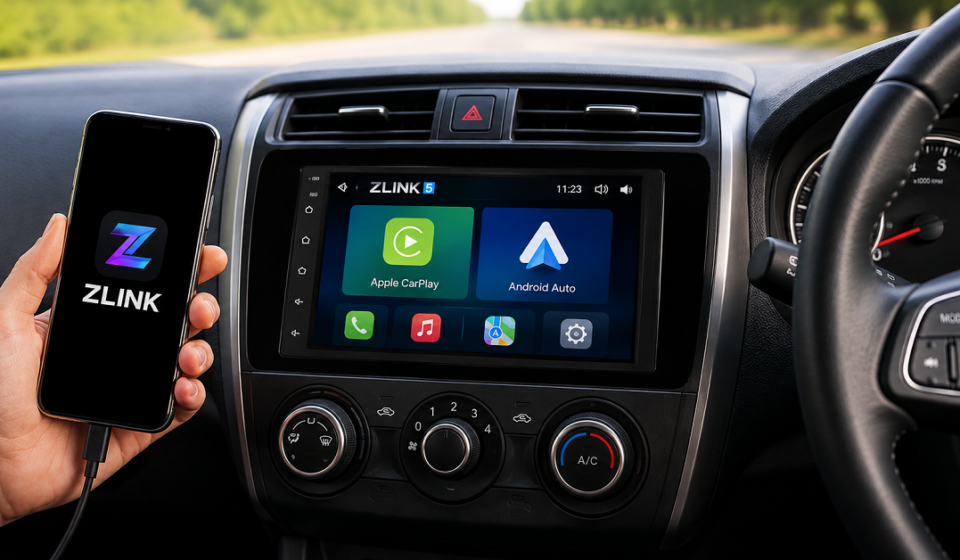
ZLINK is a connectivity app built for aftermarket Android car stereos. It allows a smartphone to link with the car’s infotainment screen and run Android Auto or Apple CarPlay. Since many aftermarket stereos are not officially certified by Google or Apple, ZLINK acts as a bridge that makes this connection possible on supported units.
How Does ZLINK Work?
How ZLINK Connects to Your Car Stereo
ZLINK runs as background software on the car’s head unit. Once a phone connects, ZLINK identifies it and activates the matching interface, either Android Auto or Apple CarPlay, on the car screen.
Wired and Wireless Connection
Users can connect their phone through a USB cable for a stable wired link. ZLINK also supports Bluetooth and Wi-Fi, allowing a wireless connection without plugging in the phone every time.
What Can You Do With ZLINK?
ZLINK brings core phone functions to the car display:
- Navigation and Maps – View live directions and traffic updates on the car screen.
- Calls and Communication – Make and receive calls hands-free while driving.
- Music and Audio – Play music and audio apps through the car’s speakers.
- Voice Commands – Control calls, navigation, and media using voice shortcuts.
Which Android Car Stereos Support ZLINK?
ZLINK Compatibility Requirements
ZLINK compatibility is not fixed across all stereos. It depends on the head unit model, its hardware, the firmware installed, and the specific ZLINK version supported by the manufacturer.
Why ZLINK Does Not Work on Every Android Car Stereo
Not every aftermarket unit ships with ZLINK pre-installed. Support depends on the chipset, firmware version, and whether the manufacturer added ZLINK compatibility.
How to Check ZLINK Compatibility
The simplest way is to check the stereo’s settings menu for a CarPlay or Android Auto option, or confirm with the manufacturer before buying. Our team has tested ZLINK on a few different head units, and this settings check consistently gave a clear answer before any setup was attempted.
What Is ZLINK 5?
ZLINK 5 is a newer version of the app, offered as an upgrade path for supported stereos. Depending on the device and firmware, it may bring improvements such as better audio streaming and navigation handling, though the exact features can vary by unit.
What Makes ZLINK Useful for Car Connectivity?
- Connects smartphones to non-certified car screens.
- Supports both wired and wireless setups.
- Works across multiple car brands and stereo models.
- Reduces phone handling while driving.
Why Is ZLINK Not Connecting?
| Issue | Likely Cause |
|---|---|
| Phone Is Not Detected | Loose USB cable or Bluetooth not paired correctly |
| CarPlay or Android Auto Does Not Start | ZLINK not enabled in the stereo’s settings menu |
| Wireless Connection Keeps Dropping | Weak Wi-Fi or Bluetooth signal interference |
| No Sound or Call Audio | Audio output not switched to the car stereo |
Is ZLINK a Phone App or Car Stereo Software?
ZLINK is not a typical phone app downloaded from an app store for daily use. It is software built into or installed on the car stereo’s Android system, and it works together with the phone to enable the connection.
Is ZLINK Safe to Use?
ZLINK itself functions as a connection tool and does not control the phone remotely. However, user experiences vary across different ZLINK versions, since app quality depends on the developer who packaged it.
Privacy Concerns With Some ZLINK Variants
A few separate apps that use a similar “ZLINK” name, but come from unrelated third-party developers, have received low ratings and privacy warnings from users. These are not the same as the ZLINK software built into the stereo, so it is safer to install versions provided directly by the manufacturer.
What Are the Limitations of ZLINK?
- Not officially certified by Google or Apple.
- Connection stability depends on the stereo’s hardware.
- Some versions do not support video streaming.
- Setup steps differ across stereo brands.
FAQs
Does ZLINK Work With Both iPhone and Android Phones?
Yes, different ZLINK versions support Android Auto for Android phones and Apple CarPlay for iPhones.
Does ZLINK Support Wireless Connectivity?
Yes, ZLINK connects wirelessly through Bluetooth or Wi-Fi, along with the standard USB option.
Does ZLINK Need an Internet Connection?
Navigation and streaming features need data from the phone, but the basic connection between phone and stereo does not require internet on its own.
Can ZLINK Work on Any Android Car Stereo?
No, it only works on stereos that support ZLINK’s firmware requirements.
Is ZLINK the Same as Apple CarPlay or Android Auto?
No, ZLINK is a separate app that enables CarPlay or Android Auto to run on stereos that are not officially certified.
Disclaimer:
This article is for general informational purposes only and is not officially affiliated with ZLINK, Google, or Apple. Compatibility, features, and setup steps may vary by device, so always confirm details with your car stereo manufacturer before use.
Read more topics on :Instamagazine.co.uk