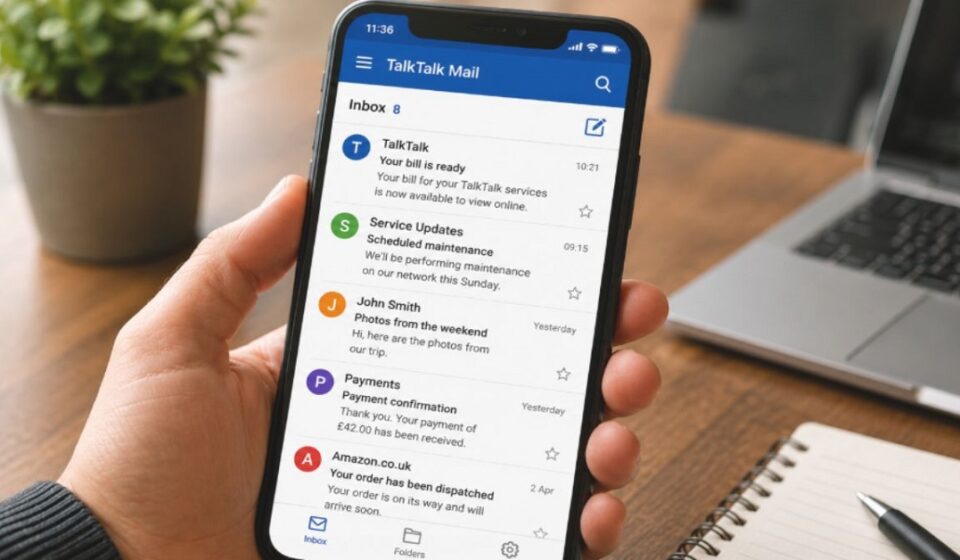

Millions of TalkTalk broadband users check their inbox every day without realizing how much this simple app quietly handles behind the scenes. From billing alerts to family photos, the TalkTalk Mail App has become a small but essential part of everyday digital life.
What Is the TalkTalk Mail App and Why Was It Built
The TalkTalk Mail App is an email service made for TalkTalk broadband customers. It was built to give users a simple way to manage their emails without needing extra tools. The goal was to keep communication easy for people who already use TalkTalk’s internet service.
How It’s Different From a Regular Email Service
Unlike general email providers, this app is tied directly to a TalkTalk account. It works closely with the user’s broadband subscription instead of standing alone. This connection makes it feel more like a personal utility than a separate email brand.
Most standard email services focus only on messaging. TalkTalk Mail, on the other hand, blends email with small productivity tools. This mix is meant to keep daily tasks in one place instead of spreading them across multiple apps.
What’s Inside the App
Inbox & Message Organization
The inbox is designed to keep messages sorted and easy to scan. Users can create folders to separate work, personal, or important emails. This basic structure helps avoid a cluttered mailbox over time.
Attachments and Media Handling
Users can send and receive files, photos, and documents directly through the app. Attachments open within the same interface, so there is no need to switch platforms. This keeps sharing simple for everyday use.
Notifications System
The app alerts users when new messages arrive. This helps people stay updated without constantly checking their inbox manually. Timely alerts are especially useful for time-sensitive emails.
Spam Management
Incoming messages are filtered before they reach the main inbox. Suspicious or unwanted emails get separated automatically. This keeps the primary folder cleaner and easier to manage.
Search Function
A search bar lets users find old emails by typing a name, subject, or keyword. This saves time compared to scrolling through long message threads manually.
Compose Experience
Writing a new email follows a straightforward layout with basic formatting options. There is nothing complicated to learn, which suits users who just want to type and send quickly.
How It Fits Into Everyday Life
For many TalkTalk customers, this app becomes the place where broadband bills and payment confirmations land first. Checking the inbox often means catching a billing update before it turns into a missed payment.
It also carries service-related messages, such as updates about broadband outages or scheduled maintenance. Staying aware of these updates helps users plan around any downtime in advance.
Family communication is another common use. Photos, event details, or quick updates from relatives often arrive here, especially for users who have relied on the same TalkTalk email address for years.
Document sharing plays a role too. Sending a scanned form, a bill copy, or a small file to a family member or service provider becomes a routine task rather than a technical one.
Based on our team’s review, the TalkTalk Mail App handles everyday email tasks in a simple and practical way. We explored its features and typical use cases to understand how it fits into daily routines, and the information shared in this guide reflects those observations.
Who Benefits Most From This App
For Everyday Home Users
People who already use TalkTalk broadband find this app convenient because everything is linked to one account. It removes the need to manage a separate email provider.
For Elderly or Less Tech-Savvy Users
The simple layout makes it easier for users who are not comfortable with complicated apps. Fewer options mean less confusion while browsing through emails.
For Small Businesses or Freelancers
Basic tools like folders and search can help freelancers manage client emails without paying for extra software. It works well for light business use rather than heavy communication needs.
How Privacy and Data Are Handled
Email accounts like this rely on password-protected access and secure sign-in methods. Secure sign-in and standard security practices help protect user accounts during normal use. Spam filtering also plays a role in blocking harmful or unwanted content before it reaches the inbox.
Users are still responsible for keeping their password strong and private. No email service can fully protect an account if login details are shared or reused elsewhere. Practicing basic safety habits remains important no matter which provider is used.
The Hidden Weaknesses and Realities of This App
Limitations in Design
The interface stays simple, but that simplicity can feel outdated compared to newer email platforms. Users who are used to modern designs may find it less visually appealing.
Common Frustrations Users Face
Users may occasionally notice slower syncing between devices depending on their connection and setup. This can feel inconvenient for people who check email frequently throughout the day.
What’s Missing Compared to Modern Email Apps
Advanced features like smart categorization, AI-based sorting, or deep third-party integrations are not part of this service. It focuses on the basics rather than cutting-edge tools.
| Aspect | TalkTalk Mail | Modern Email Apps |
| Design | Simple layout | Modern, customizable interface |
| Smart Sorting | Not available | Often available |
| Sync | Can occasionally feel slower | Generally faster |
| Core Focus | Email + basic organization | Email + advanced automation |
Common Misconceptions People Have About This App
- Many assume it works only on desktop, but it can also be accessed through mobile browsers.
- Some think it is completely separate from TalkTalk services, when it is actually tied to the broadband account.
- Others believe it lacks any organizational tools, though folders and search are already built in.
Where This App Might Be Headed in the Future
As user expectations around email tools continue to rise, future improvements could include better sorting and faster syncing across devices. Steady, small updates would help the app stay useful without needing a complete redesign.
FAQS
Is the TalkTalk Mail App free to use?
Yes, it comes as part of a TalkTalk broadband subscription, so there is no separate charge for using it.
Can I access TalkTalk Mail from a mobile browser?
Yes, the service can be opened through a mobile browser, and it works without needing a dedicated download.
Does the app support attachments and file sharing?
Yes, users can send and receive photos, documents, and other files directly within the app.
Does the TalkTalk Mail App have spam protection?
Yes, incoming messages are filtered automatically to help keep unwanted or suspicious emails out of the main inbox.
Is the TalkTalk Mail App suitable for business use?
It works well for light business needs like managing client emails, but it lacks advanced tools found in dedicated business email platforms.
Is my data safe while using TalkTalk Mail?
The service uses secure sign-in and standard security practices to help protect accounts, though users should still maintain strong, unique passwords.
Final Thoughts
The TalkTalk Mail App works best for users who want a simple, no-fuss email experience tied to their broadband account. It is not built for people who need advanced automation or a highly modern interface. For everyday communication, though, it still gets the job done without unnecessary complexity.
Disclaimer:
This article is for informational purposes only and is based on our team’s research and review of the TalkTalk Mail service. It is not affiliated with, endorsed by, or officially published by TalkTalk.
Explore more topics on :Instamagazine.co.uk