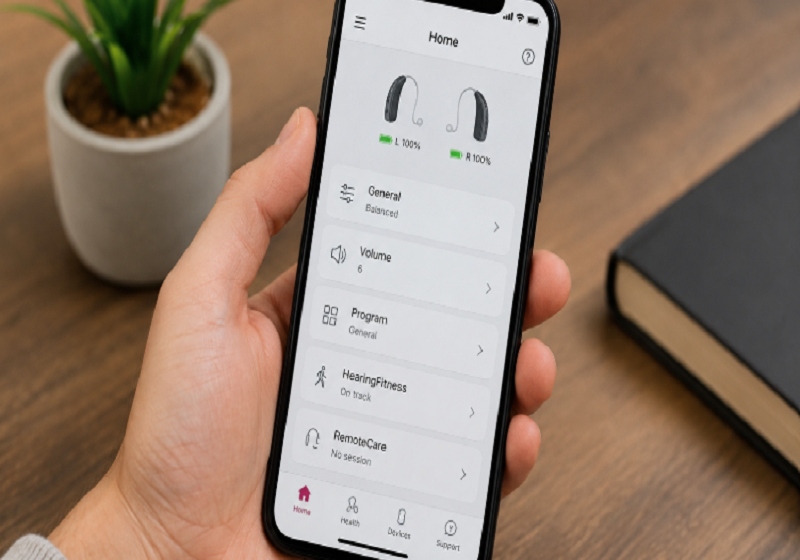

The Oticon Companion App is a mobile app that lets you control and adjust Oticon hearing aids using your smartphone. In this article, we will explain its main features, compatibility, benefits, limitations, and common issues in a simple and easy-to-understand way.
What Is the Oticon Companion App?
The Oticon Companion App is a free mobile app that connects directly to compatible Oticon hearing aids through Bluetooth. It allows users to adjust volume, switch listening programs, check battery levels, find lost hearing aids, and receive remote support from a hearing care professional.
The app combines the features of the older Oticon ON and RemoteCare apps into one place, making hearing aid management simpler and more convenient. It also lets users make adjustments discreetly through their smartphone while in public.
Who Can Use the Oticon Companion App?
The Oticon Companion App is designed for adults who use Oticon Bluetooth hearing aids. According to the official instructions, it is intended for users over 18 years of age and is not designed for younger users.
The app is available for both iPhone and Android devices worldwide. It supports over 30 languages and can be used with compatible Oticon hearing aids and supported smartphones.
The app is especially helpful for new hearing aid users because it keeps all controls in one place. It is also a convenient upgrade for people switching from the older Oticon ON app, offering familiar features along with newer functionality.
Compatible Devices and Hearing Aids
The Oticon Companion App works on both iPhone and Android smartphones. For iPhone users, the app requires iOS 15.0 or later, and iOS 15.2 or higher is recommended for the best performance. Android users need Android OS 8.0 or higher, though Android 10 or later gives optimal results.
The app is compatible with all Oticon Bluetooth hearing aids, from newer models like Oticon Intent, Oticon Real, and Oticon Zeal to older models going back to the Oticon Opn. Users with hearing aids from 2016 to 2018 may need a firmware update before the app works properly. For Android audio streaming, the phone must support Bluetooth LE Audio or ASHA technology, otherwise a separate accessory like ConnectClip is needed.
Main Features of the Oticon Companion App
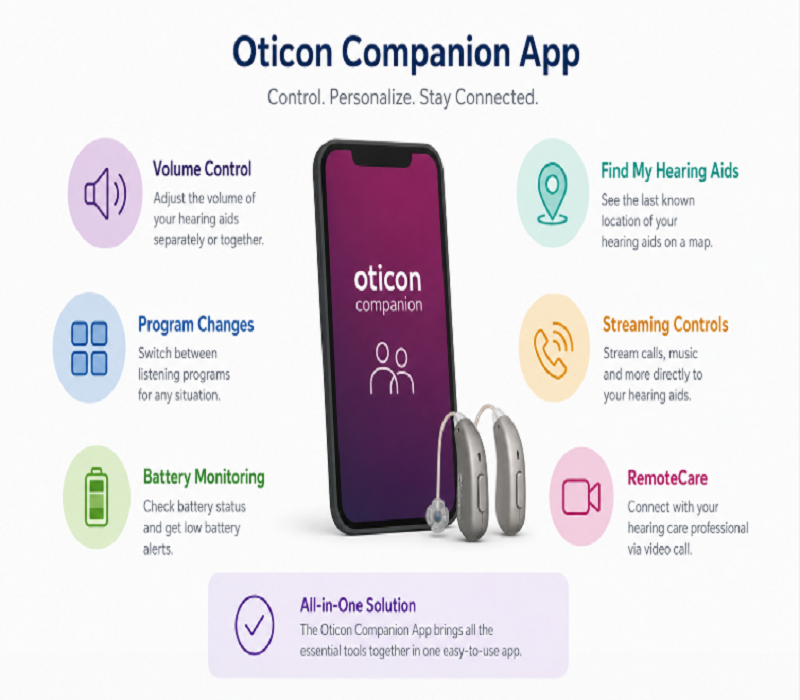
The Oticon Companion App comes with several built-in features that make managing hearing aids much easier. Each feature serves a specific purpose and addresses a real need that hearing aid users face in daily life. Together, they give users full control over their hearing experience from their smartphone.
Volume Control
The app lets you adjust the volume of each hearing aid separately or both at the same time. This is useful in situations where one ear needs more sound than the other, such as in a noisy room. The app also has a “remember volume” option that saves your preferred volume for each program automatically.
Program Changes
Your hearing care professional sets up different listening programs in your hearing aids based on your needs. These programs are designed for different environments like home, restaurant, music, or outdoor settings. You can switch between them instantly from the app without touching your hearing aids.
Battery Monitoring
The app shows the battery level of each hearing aid directly on your screen. You can also set battery notifications so the app alerts you when the level drops below a certain point. For rechargeable hearing aids, the app also displays the charging status when the devices are placed in their charger.
Find My Hearing Aids
The Find My Hearing Aids feature helps you locate a misplaced hearing aid using your phone. It shows the last known location where the hearing aid was connected to the app on a map. Note that this feature does not track in real time and requires location services to be enabled on your phone at all times.
Streaming Controls
The app allows you to stream phone calls, music, podcasts, and other audio directly to your hearing aids. It also includes a streaming equalizer that lets you adjust bass, mid, and treble tones for a more personalized listening experience. The app also lets you use your phone as a remote microphone, which is helpful in group settings or noisy environments.
RemoteCare
RemoteCare allows your hearing care professional to adjust your hearing aids through a live video call inside the app. You do not need to visit the clinic for follow-up appointments or minor adjustments. This is especially useful for people with busy schedules, limited mobility, or those who live far from their audiologist.
How the App Improves Your Hearing Experience
The Oticon Companion App does more than just control hearing aids; it helps make the listening experience more personal and comfortable. Users can adjust settings in real time based on their environment instead of relying only on default hearing aid settings.
Our team tested the app in everyday listening situations and found that making quick adjustments from a smartphone can make hearing aids easier and more convenient to use throughout the day.
One of the biggest benefits is the ability to switch programs instantly and receive support through RemoteCare. This allows users to adapt to different environments and stay connected with their hearing care professional without visiting a clinic.
Standout Features That Set the App Apart
Some features in the Oticon Companion App go beyond basic hearing aid control. These features address specific challenges that hearing aid users face in their daily lives. They are what make this app stand out from other hearing aid companion apps on the market.
Speech Booster
SpeechBooster helps you focus on speech in noisy environments by reducing background noise and bringing the speaker’s voice closer to you. You activate it manually from the app when you need it, giving you full control over when to use it. This feature is not available on Oticon Opn, Ruby, Zircon, Jet PX, and Zeal models.
Hearing Fitness
HearingFitness monitors how many hours a day you wear your hearing aids and lets you set a daily wear-time goal. Research shows that consistent hearing aid use helps the brain adjust to processed sound more effectively. This feature is currently available only for Oticon Intent, Real, and Zeal models.
Auracast Support
Auracast allows your hearing aids to connect directly to public audio systems in places like airports, theaters, and lecture halls through the app. You can connect by scanning a QR code or selecting a broadcast manually, and the sound streams directly into your hearing aids. This feature requires Bluetooth LE Audio support and only works where the venue has installed a compatible transmitter.
Apple Watch Integration
The Oticon Companion App includes a dedicated Apple Watch app that lets you adjust volume, switch programs, and check battery levels from your wrist. This is useful in social situations where using your phone might feel obvious or inconvenient. The Apple Watch integration requires watchOS 7.4 or later to work properly.
Offline and Online Features Explained
| Offline Features | Online Features |
| Volume Control | RemoteCare Appointments |
| Program Switching | App Support Resources |
| Battery Monitoring | Find My Hearing Aids Map |
| Muting Surroundings | Requires Internet Connection |
| SpeechBooster | May Not Work Offline |
Limitations of the Oticon Companion App
The Oticon Companion App is a powerful tool, but it does have some limitations that users should know before relying on it fully. Not every feature works on every hearing aid model, and some functions depend on the type of smartphone you are using. Understanding these limitations helps you set realistic expectations from the app.
Android users face more restrictions compared to iPhone users. Direct audio streaming on Android only works if the phone supports Bluetooth LE Audio or ASHA technology. Phones that lack these technologies require a separate accessory like ConnectClip for streaming to work.
Some users have reported that the app occasionally stops working and requires reinstalling to function again. Bluetooth connectivity issues, especially on Android devices, are a commonly reported concern. These technical problems can be frustrating for users who depend on the app daily.
Common Issues and How to Fix Them
Like any app, the Oticon Companion App can sometimes run into technical problems that affect daily use. Most of these issues have simple fixes that you can do at home without visiting a clinic. Knowing what to do when something goes wrong saves time and reduces frustration.
App Not Connecting to Hearing Aids
The most common issue users face is the app losing connection to one or both hearing aids. To fix this, turn Bluetooth off and back on, then restart both your phone and hearing aids. If the problem continues, forget the hearing aids in your phone’s Bluetooth settings and pair them again from scratch.
App Stops Working or Freezes
Some users report that the app stops responding or crashes after a period of use. The first step is to close the app completely and reopen it, which clears temporary files causing the problem. If that does not help, uninstalling and reinstalling the app from the App Store or Google Play usually resolves it.
Only One Hearing Aid Showing in the App
Sometimes the app detects only one hearing aid instead of both at the same time. Restart both hearing aids by placing them in the charger for a few seconds and taking them out again. If the issue continues, check that both devices are updated to the latest firmware version.
RemoteCare Session Not Starting
If RemoteCare is not connecting, the most likely cause is a weak or unstable internet connection. Make sure you are on a stable Wi-Fi network before starting the session. Also confirm that your app is updated to the latest version, as older versions may have RemoteCare bugs.
Frequently Asked Questions About the App
Is the Oticon Companion App free to download?
Yes, the Oticon Companion App is completely free to download from both the Apple App Store and Google Play Store. No subscription fees or hidden charges apply.
Does the app work without an internet connection?
Most daily features like volume control and program switching work offline through Bluetooth. Only RemoteCare and the Find My Hearing Aids map require an internet connection.
Is the app available for both iPhone and Android?
Yes, the app is available for both iPhone and Android. iPhone needs iOS 15.0 or later and Android needs OS 8.0 or higher.
Can I use the app with older Oticon hearing aids?
Yes, the app supports all Oticon Bluetooth hearing aids going back to the Oticon Opn. Older models from 2016 to 2018 may need a firmware update first.
Does the app replace the need for clinic visits?
The app reduces routine visits through RemoteCare but does not fully replace in-person appointments. Complex fittings and hearing tests still require a clinic visit.
Can I control my hearing aids from an Apple Watch?
Yes, compatible Apple Watch devices can be used to adjust volume, switch programs, and check battery levels.
Do I need Bluetooth to use the Oticon Companion App?
Yes, Bluetooth is required to connect the app with compatible Oticon hearing aids.
How do I update the Oticon Companion App?
You can update the app through the Apple App Store or Google Play Store.
Disclaimer:
This article is for informational purposes only. App features, compatibility, and availability may vary by hearing aid model, device, and software version. For the most accurate information, consult official Oticon resources or a hearing care professional.
Read more topics on :Instamagazine.co.uk