
Schools deal with hundreds of students every single day. Keeping track of every safeguarding concern, wellbeing issue, and pastoral incident manually creates room for mistakes and missed concerns. The CPOMS App solves this problem by giving schools a smart, secure, and simple digital system where staff can record concerns quickly, DSLs get instant alerts, and nothing ever gets lost.
What is CPOMS App?
CPOMS stands for Child Protection Online Management System. It was founded in 2011 with one clear goal to make safeguarding in schools faster, smarter, and more reliable. Today it is part of Raptor Technologies, a global leader in school safety solutions.
More than 20,000 schools and educational settings worldwide now use CPOMS. It replaced slow, paper-based safeguarding systems and brought everything into one secure online platform. Schools trust it because it is purpose-built for real educational environments and designed around the daily needs of teachers and safeguarding leads.
The platform works on any internet-connected device. There is no complicated setup and no heavy IT infrastructure required. Schools simply sign up, set up their staff accounts, and start using it right away.
Main Purpose
The main purpose of CPOMS is to protect every child in a school. It gives staff one central place to record every safeguarding concern, pastoral issue, and wellbeing incident. No concern gets forgotten and no important detail gets missed.
It also connects every staff member under one shared system. A classroom teacher, teaching assistant, or school manager can all log concerns directly from their device. The Designated Safeguarding Lead receives instant alerts and can take the right action immediately without any delay.
CPOMS also helps schools build a complete picture of each student over time. Small concerns that seem unrelated can come together to reveal a bigger pattern. This early identification helps schools step in and support vulnerable students before situations become serious.
How Does It Work?
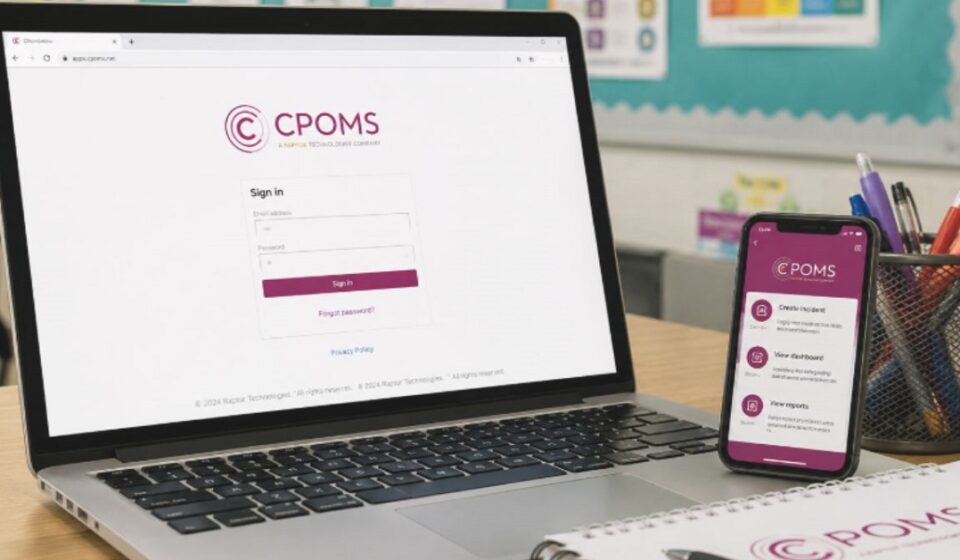
A staff member notices something concerning a student during the school day. They open CPOMS on their phone, tablet, or computer and log the incident with full details. The process takes only a few minutes and requires no technical knowledge.
The system saves the record instantly and securely in the cloud. The Designated Safeguarding Lead receives a real-time alert and reviews the concern straight away. They can add notes, assign follow-up actions, and monitor the entire process from their dashboard.
Every single step is recorded with a date and time stamp. This creates a full audit trail that schools can refer back to at any time. Whether it is for an internal review or an Ofsted inspection, all records are organized and ready to access immediately.
CPOMS App Key Features
Incident Logging
Staff can log any safeguarding or wellbeing concern directly from their mobile device or computer. The process is straightforward and fast. Even staff members with basic digital skills can use it confidently from day one.
Real-Time Alerts
As soon as a concern is logged in the system, the DSL receives an instant notification. Urgent cases are never delayed. The right person gets the information they need at exactly the right moment.
Chronological Records
Every incident is stored in date and time order automatically. This builds a clear and accurate timeline for each student. Patterns and repeated concerns become easy to spot, helping staff make informed decisions quickly.
Automated Reports
CPOMS generates reports automatically when schools need them. Ofsted-ready documents can be produced in just a few clicks. Schools save hours of manual work and always have accurate, up-to-date records available.
How CPOMS Protects Your Data
CPOMS takes data security very seriously. Every user must complete Multi-Factor Authentication before accessing the system. This extra layer of protection ensures that only authorized staff members can view sensitive student information.
All data is stored on secure, encrypted cloud servers. Schools can also set specific access levels for each staff member based on their role. A classroom teacher sees only what is relevant to them, while the DSL has full visibility across the entire system.
| Security Feature | Details |
| Multi-Factor Authentication | Every login requires identity verification |
| Encrypted Cloud Storage | All data is stored securely online |
| Role-Based Access | Staff see only what their role allows |
| Audit Trail | Every action is recorded with date and time |
Who Is It For?
Schools & Academies
Primary and secondary schools use CPOMS to record and manage all student safeguarding concerns in one place. It supports both teaching staff and safeguarding leads daily.
Multi-Academy Trusts
MATs use CPOMS to monitor safeguarding activity across multiple schools at the same time. Senior leaders get a clear overview without visiting each school individually.
Nurseries & Early Years
Early years settings use CPOMS to track the wellbeing of very young children. Concerns are logged quickly and shared with the right people without any delay.
Other Organizations
CPOMS is not limited to schools only. Football clubs, care settings, and other youth organizations also use it to manage welfare and safeguarding concerns for the young people in their care.
Key Advantages of Using CPOMS
| Benefit | Detail |
| Paperless System | No physical files, folders, or lost documents |
| Easy to Use | Simple interface that anyone can learn quickly |
| Works on Any Device | Fully accessible on phone, tablet, or computer |
| Staff Training Tracking | Keeps all staff training records in one place |
CPOMS reduces the administrative burden on staff significantly. Teachers spend less time on paperwork and more time focusing on their students. Everything runs faster, smoother, and with far greater accuracy than any paper-based system ever could.
Student Safety
Student safety is at the heart of everything CPOMS does. When a student moves from one school to another, their complete safeguarding history transfers securely with them. No critical information is ever lost during the transition.
The system helps schools identify vulnerable students early. Multiple small concerns logged over time connect into a visible pattern that one staff member alone might never notice. Early identification means early support, and early support makes a real difference in a child’s life.
CPOMS also keeps schools fully compliant with Ofsted safeguarding requirements. All records are dated, organized, and inspection-ready at all times. Schools never have to scramble for documents when an inspection arrives.
Conclusion
Our team has personally experienced the CPOMS App and all the information in this article is based on our firsthand knowledge. It has completely changed how schools approach safeguarding by replacing slow paper systems with a fast and secure digital platform. Every concern gets recorded, every alert reaches the right person, and every student receives the attention they deserve. CPOMS is not just a piece of software, it is a safeguarding partner that over 20,000 schools worldwide trust every single day.
FAQs
What is the CPOMS App?
CPOMS App is a secure digital platform that helps schools record and manage safeguarding, wellbeing, and pastoral concerns in one place.
Who can use the CPOMS App?
Schools, Multi-Academy Trusts, nurseries, early years settings, football clubs, and other youth organizations can all use CPOMS.
Is the CPOMS App easy to use?
Yes, CPOMS is very easy to use. Any staff member with basic digital skills can log concerns quickly from any device without any technical knowledge.
How does CPOMS keep data secure?
CPOMS uses Multi-Factor Authentication, encrypted cloud storage, and role-based access to ensure only authorized staff can view sensitive student information.
Does CPOMS help with Ofsted inspections?
Yes, CPOMS automatically generates Ofsted-ready reports. All records are organized, dated, and inspection-ready at all times.
Disclaimer:
The information provided in this article is based on our team’s research and firsthand experience with the CPOMS App. It is intended for general informational purposes only and may not reflect the most recent updates or changes made by CPOMS or Raptor Technologies.
Read more topics on :Instamagazine.co.uk