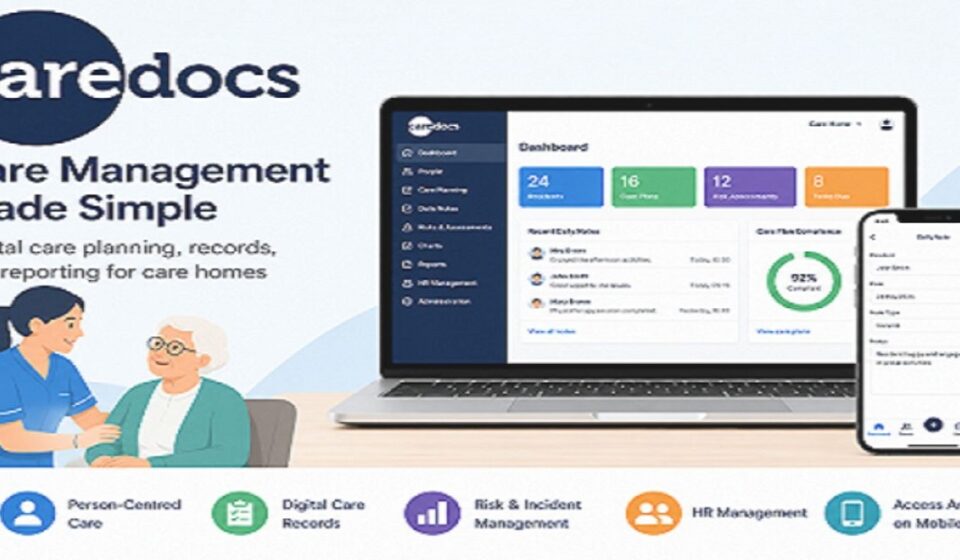

Care homes generate huge amounts of paperwork every day. Staff often spend more time writing notes than caring for residents. CareDocs solves this problem by turning paper-based care records into a digital system.
What is CareDocs?
Care Management Systems Ltd, based in Bristol, created CareDocs. The company has supported UK care providers for more than two decades. CareDocs was built specifically for residential and nursing homes.
The software follows a person-centred care model. This means every record reflects what an individual resident needs and prefers, not just medical data. Staff can update these records directly from a tablet or computer.
CareDocs vs CareDoc: Clearing the Confusion
Many people search for “CareDocs” but land on a different app called “CareDoc.” These two products are not related in any way. CareDocs is the UK care home software covered in this article.
CareDoc, available on Google Play, helps users scan and digitize proof of care documents. A separate CareDoc app on the Apple App Store supports medical research studies that Massachusetts General Hospital runs. Neither app connects to the UK-based CareDocs platform.
Who is CareDocs Designed For?
CareDocs serves residential care homes, nursing homes, and similar care facilities across the UK. The platform suits small care homes as well as larger multi-site providers. Both frontline care staff and management teams use its tools every day.
Main Features
CareDocs offers a wide range of tools that cover daily care tasks and administrative work. Each feature works together inside one connected system. The sections below explain every major feature in detail.
Service User Profiles
Each resident gets a personal profile inside CareDocs. This profile stores preferences, history, and care needs in one place. Staff can access this information instantly during any shift.
Daily Notes & Forms
Caregivers record daily activities directly through digital forms. These notes replace handwritten logs that often get lost. The system keeps every entry organized and searchable.
Charts & Body Maps
CareDocs includes charts for tracking health measurements over time. Body maps help staff record and monitor skin conditions or injuries. Both tools support accurate, visual record-keeping.
Risk Assessments
The platform provides built-in risk assessment tools for common care concerns. Staff complete these assessments digitally during routine checks. This helps homes identify and manage risks early.
Emotion Mapping
Emotion mapping lets staff log a resident’s mood and emotional state throughout the day. This data helps caregivers notice patterns linked to comfort or distress. Tracking emotions in this way supports more thoughtful care decisions.
HR Management Tools
Beyond care records, CareDocs also manages staff-related administrative tasks. Care homes can track schedules, qualifications, and other HR details. This combines care delivery and staff management in one system.
CareDocs’ Different Access Points
CareDocs offers three separate ways to access the system, depending on the user’s role. Each access point serves a different purpose within a care home. The sections below explain how each one works.
caredocs.app (Tenant Login)
This portal works through a tenant name unique to each care organization. Users enter this tenant name to reach their organization’s specific CareDocs environment. It acts as the main entry point for connected care homes.
Cloud Portal (Office Access)
The Cloud Portal serves office-based staff and management teams. Users log in with a Home ID, username, and password. This portal handles administrative and oversight tasks for the entire care home.
Mobile Portal (Field Staff Access)
The Mobile Portal allows caregivers to update records directly from a phone or tablet. Staff can enter daily notes, update charts, and record care at the resident’s bedside. This reduces delays between providing care and recording it.
Pros and Cons
Pros
CareDocs reduces paperwork and saves time for care staff. It centralizes care records, risk assessments, and HR tools within one system. Staff can also switch between mobile and desktop access depending on their role.
Cons
New staff may need time to learn the different access points and features. Pricing details are not published openly, so providers must request a demo for cost information. This makes it harder to compare costs quickly with other software.
Is CareDocs Safe?
CareDocs stores data using Azure SQL databases, which are encrypted at rest by default. The system also encrypts all communication between users and the servers. This protects sensitive resident and staff information from unauthorized access.
The platform receives regular updates to stay aligned with health and care regulations. Past updates have addressed compliance needs, including changes related to COVID-19 guidelines. This ongoing maintenance helps care homes meet regulatory standards over time.
CareDocs vs Competitors
Several other platforms compete in the same care management space, including Nourish Care, Access Group, and xCare. These platforms offer similar tools like scheduling, care planning, and mobile access for staff. Each provider focuses on slightly different strengths within the care sector.
CareDocs stands out through its combined focus on care planning and HR management in one platform. Many competitors split these functions across separate products or add-ons. This integration can simplify daily operations for care homes that want one unified system.
Pricing & Demo
CareDocs does not publish fixed pricing on its website. Interested care homes can book a free demo to see the software and discuss costs directly with the provider. This approach allows pricing to match the specific needs of each care home.
FAQs
How secure is CareDocs Mobile?
CareDocs Mobile uses the same encrypted database system as the rest of the platform. The system protects data during both transmission and storage. This keeps resident information secure even when accessed remotely.
Who created CareDocs?
Care Management Systems Ltd, a UK-based company, created and maintains CareDocs. The company specializes in software designed for residential and nursing care providers. Their team works directly with care homes to support day-to-day use of the platform.
What if I face login issues?
Entering the wrong Home ID, username, or tenant name often causes login problems. Double-checking these details usually solves the issue. If problems continue, contacting CareDocs support directly is the best next step.
Is a free trial available?
CareDocs does not advertise a self-service free trial on its website. Instead, the company offers a free demo session for interested care homes. This demo lets providers explore the system before making a decision.
Conclusion
Our team has used CareDocs directly within a care home setting to test its day-to-day performance. This hands-on experience shaped the insights and details shared throughout this guide. We focused on real usage rather than just marketing claims.
CareDocs offers a complete digital solution for care homes looking to reduce paperwork and improve resident care. Its combination of care planning, risk assessment, and HR tools sets it apart from many competitors. Care homes considering a switch from paper records may find CareDocs a strong, well-established option.
Disclaimer:
This article is for informational purposes only and is not affiliated with or endorsed by CareDocs or Care Management Systems Ltd. Information may change over time, so please verify details directly with the official CareDocs website before making any decisions.
Read more topics on :Instamagazine.co.uk