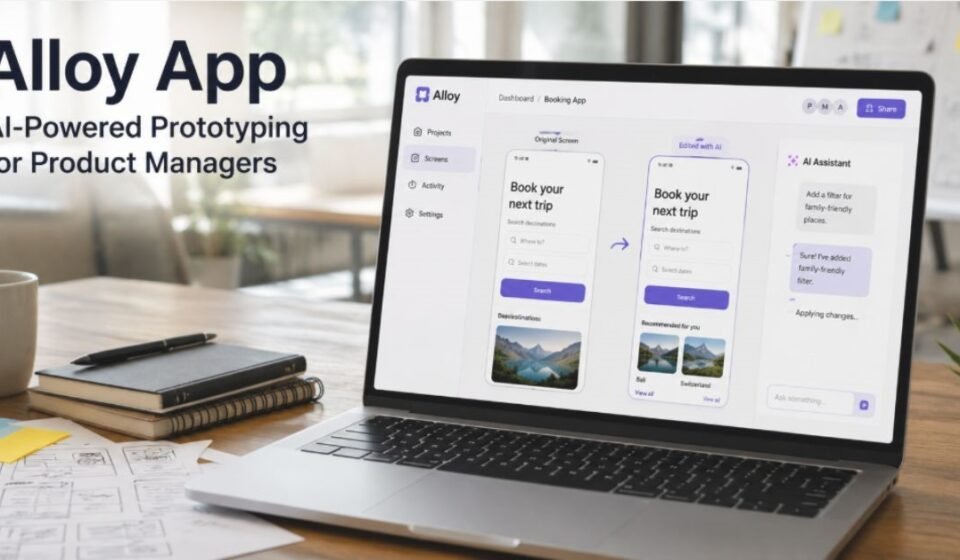

Building a working prototype usually takes time, tools, and technical skill. Alloy App changes this by letting anyone turn a real product page into an editable prototype using simple text prompts.
What is Alloy App?
Alloy App is an AI-powered prototyping tool built for product managers. It captures real web pages and turns them into editable prototypes. Users can change these prototypes using simple text prompts instead of writing code manually.
Unlike traditional design tools, Alloy starts from an actual product screen rather than a blank canvas. This keeps every prototype grounded in real branding and layout. It saves teams from rebuilding interfaces from scratch.
How Does Alloy App Work
The captured page becomes a base screen inside the tool, and users type prompts to add features or adjust layouts. The AI processes each request and updates the prototype in real time. Every session runs in a cloud sandbox, so team members can open a shared link and continue right where work was left off.
Core Features of Alloy App
Page Capture via Browser Extension
A one-click browser extension lets users pull in any web page as a starting point for edits. This removes the need to recreate designs manually before making changes.
AI Conversational Editing
Users edit prototypes by typing prompts in a chat-style interface. The AI interprets these prompts and applies changes instantly. This replaces manual drag-and-drop design work.
High-Fidelity Prototype Generation
Every prototype generated by Alloy matches the brand’s original look and feel. Colors, fonts, and layouts stay consistent with the source product. This gives prototypes a realistic, production-like appearance.
Codebase Integration & Pull Requests
Changes made in Alloy connect directly to the actual codebase. Teams can push updates as pull requests once a design is approved. This links the prototyping stage directly to real development work.
Who Is Alloy App Best For
Product Managers
Product managers use Alloy to test ideas without depending on developers. They can visualize a feature before committing engineering resources to it.
Design Teams
Design teams use Alloy to speed up iteration cycles. Since prototypes reflect real product screens, feedback becomes more accurate and actionable.
Startups & Agencies
Startups and agencies use Alloy to pitch ideas quickly. High-fidelity prototypes help clients and investors visualize a concept clearly.
Alloy App Pricing Structure
Alloy offers a Pro plan priced at $20 per month, which unlocks unlimited AI prompting for editing prototypes. Other pricing tiers are not publicly listed, so teams should confirm details on the official pricing page.
| Plan | Price | Key Benefit |
| Pro Plan | $20/month | Unlimited AI prompts |
Benefits & Advantages of Alloy App
- Creates prototypes that look like the real product
- Reduces dependency on manual design tools
- Speeds up feedback cycles with stakeholders
- Connects design changes directly to code through pull requests
- Works across desktop, web, and mobile platforms
Limitations and Drawbacks of Alloy App
- Initial prototype generation can take several minutes
- Best suited for single-page prototypes rather than multi-page flows
- No side-by-side canvas view for comparing screens
- Still a relatively new product with evolving features
Alloy App vs Traditional Prototyping Tools
| Factor | Alloy App | Traditional Tools |
| Design Source | Captures real product pages | Built from scratch manually |
| Editing Method | AI text prompts | Manual drag-and-drop |
| Code Connection | Links to actual codebase | Usually separate from code |
| Speed of Setup | Fast, page-based capture | Slower, manual recreation |
Behind the Scenes: How Alloy’s AI Replicates Design
Alloy’s AI analyzes the structure of a captured page, including its layout, colors, and components. It then rebuilds this structure inside an editable sandbox environment.
When a user submits a prompt, the AI matches the request against this existing structure. It adjusts only the relevant elements while keeping the rest of the design intact.
This targeted approach avoids breaking unrelated parts of the prototype during edits. It also means small changes, like updating a button color, do not require touching the entire layout.
Alloy App’s Future and Roadmap
AI prototyping tools are evolving quickly across the industry, with a general shift toward deeper integrations and faster generation speeds. Tools like Alloy are part of this broader trend of connecting design directly to real codebases.
As adoption grows, platforms in this space are likely to focus on reducing generation time and expanding support for multi-page workflows.
Is Alloy App Right for You?
Alloy suits teams that want to test ideas quickly without heavy design or development effort. It works well for single-screen concepts and fast stakeholder reviews.
Teams needing complex, multi-page prototypes may find current limitations restrictive. For simple, fast validation, Alloy offers a practical solution.
Before adopting Alloy, it helps to test it on one real screen first. This gives a clear sense of speed and output quality before scaling usage across a larger team.
Our own team tried Alloy on a real project screen and shared feedback directly with the app while testing it. The experience showed how quickly a rough idea could turn into a working prototype.
FAQs
What is the Alloy app?
Alloy is an AI prototyping tool that turns real web pages into editable, high-fidelity prototypes.
What does Alloy do?
It captures existing product pages and lets users edit them using AI prompts instead of manual design work.
What is Alloy coding?
Alloy connects design changes to real code, allowing users to push approved edits as pull requests.
What is Alloy and its application?
Alloy is applied in product management, UI design, and rapid prototyping for startups and agencies.
Conclusion
Alloy App simplifies prototyping by combining real product capture with AI-driven editing. It bridges the gap between design and development through direct code integration. For teams seeking fast, realistic prototypes, Alloy offers a practical and efficient approach.
Disclaimer:
This article is based on publicly available information and our team’s hands-on experience with Alloy App. Features and pricing may change over time, so always verify the latest details on the official website.
Explore more topics on :Instamagazine.co.uk