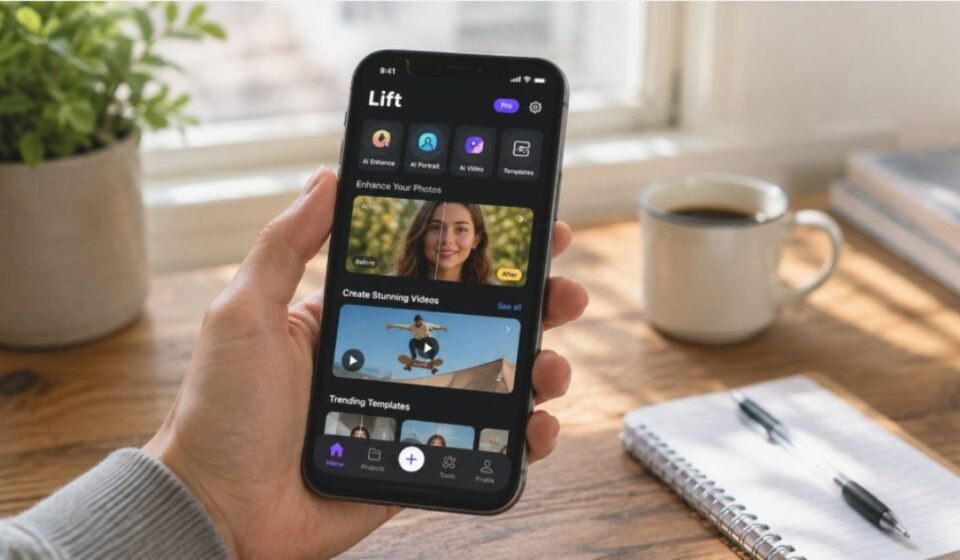

Lift App is an AI-powered platform built for photo and video editing. It creates polished content for social media posts, business branding, and personal creative projects. This guide covers every important aspect of Lift App in clear and simple language.
History and Background of Lift App
A Ukrainian technology company founded Lift in 2020, with a focus on social media tools. The company built the app to help creators design content faster and more easily. Since its launch, Lift has grown into one of the most downloaded photo and video editing apps for creators around the world. The app now supports millions of installs across mobile and web platforms.
How Lift App Works
Lift works through artificial intelligence models that analyze uploaded photos and videos. Users either upload an existing image or type a text prompt to generate new visuals. The app then applies enhancements, filters, or templates automatically based on the chosen style. This automated process removes the need for manual editing skills or technical training.
Core Features
Lift offers a wide range of AI-driven tools for content creation. Each feature targets a specific editing need, from photo repair to full video production.
AI Photo Enhancer Feature
This tool improves blurry or low-quality photos in seconds. It sharpens fine details and increases resolution with a single tap. Users get clearer, sharper images without any extra editing effort.
AI Video Editor and Beat-Sync Templates
The video editor syncs clips automatically with music beats. Users can add animated text, stickers, and visual effects with ease. This feature works well for Reels, Stories, and other short-form video content.
AI Hairstyle and Outfit Changer
This feature lets users preview different hairstyles and outfits digitally. The AI applies these changes directly onto uploaded photos. It works instantly, without needing any physical styling session.
AI Headshot and Portrait Generator
Lift can turn ordinary selfies into polished, high-quality headshots. These images suit LinkedIn profiles, resumes, and workplace branding needs. The tool helps users avoid the cost of hiring a professional photographer.
1000+ Templates and Design Tools
Lift provides more than a thousand ready-made templates for various formats. These templates cover Stories, Reels, Posts, and Collages. Users can freely customize each template with their own photos and text.
Who Can Benefit from Lift App
Different types of users find real value in using Lift App for their daily or professional needs.
Lift App for Content Creators
Creators use Lift to design Reels and Stories quickly and consistently. The large template library saves valuable time during content planning. This convenience helps creators publish new content more often.
Lift App for Businesses and Professionals
Businesses use Lift to build branding and marketing visuals in-house. The AI headshot generator helps teams create polished profile images. Small companies can produce quality content without hiring a full design team.
Lift App for Students and Casual Users
Students use Lift for personal projects, assignments, and social posts. The tool suits quick, one-off edits without needing extra software. Casual users also enjoy fast photo touch-ups for everyday sharing.
Lift App vs Other Similar Apps
Lift competes with several other AI editing platforms currently available in the market.
Difference Between Lift App and Impresso
Impresso allows users to place multiple photos within one single scene, unlike Lift. However, some users report that Lift offers stronger music integration for videos. Lift also helps creators avoid copyright flags when posting to platforms like Instagram.
What Makes Lift App Different from Other AI Editors
Lift combines photo editing, video editing, and AI image generation within a single app. Many competing platforms focus on only one of these individual functions. This all-in-one approach reduces the need for switching between multiple separate apps.
Pricing and Plans
Lift follows a freemium pricing model that includes both free and paid subscription tiers. The free version gives limited access to editing tools and premium templates. The Pro plan unlocks full app features and removes watermarks from exported content. Some users have reported unclear billing communication during free trial periods, so reviewing the subscription terms carefully before signing up is strongly advisable.
Pros and Cons
The table below summarizes the app’s key strengths and weaknesses, based on publicly available user feedback and app store reviews.
| Advantages of Lift App | Disadvantages of Lift App |
| Easy to use, even for beginners | Some premium features require a paid plan |
| Large and varied template library | Occasional account access issues reported |
| Strong AI photo and video editing tools | Requires a stable internet connection to work |
| Combines multiple editing tools in one app | Free-tier access remains fairly limited |
Real User Experience with Lift App
User reviews on app stores show a mixed range of experiences overall. Many users praise the templates, filters, and AI enhancement tools available in the app. Others mention occasional bugs or slow customer support responses. Ratings and feedback vary between platforms, reflecting different individual user experiences.
Our team personally tested Lift App before writing this guide, and their hands-on experience and suggestions shaped the practical insights shared throughout this article.
Privacy and Safety of Lift App
Lift requires users to sign in through existing Google, Apple, or Facebook accounts. The app processes uploaded photos and videos through AI servers to apply edits. Users should always review the app’s privacy policy before uploading sensitive personal images. Official app store listings publicly show the app’s standard data handling practices.
The Future of Lift App
AI-based editing tools continue to grow rapidly in popularity across social media platforms. Lift holds a strong position within this expanding market of creative AI applications. Continued updates to its underlying AI models may further improve accuracy, speed, and output quality. The app’s long-term growth will likely depend on maintaining user trust alongside steady feature innovation.
Conclusion
Lift App offers a complete toolkit for photo and video editing through artificial intelligence. It suits content creators, businesses, students, and casual users alike, each in different ways. Reviewing its pricing terms carefully before subscribing helps ensure a smooth overall experience. For anyone seeking fast, AI-driven content creation, Lift App remains a strong and practical option.
Disclaimer:
This article is for informational purposes only and is based on publicly available information, official sources, and practical testing. Features, pricing, and policies may change over time, so always verify the latest details through Lift App’s official channels.
Read more topics on :Instamagazine.co.uk