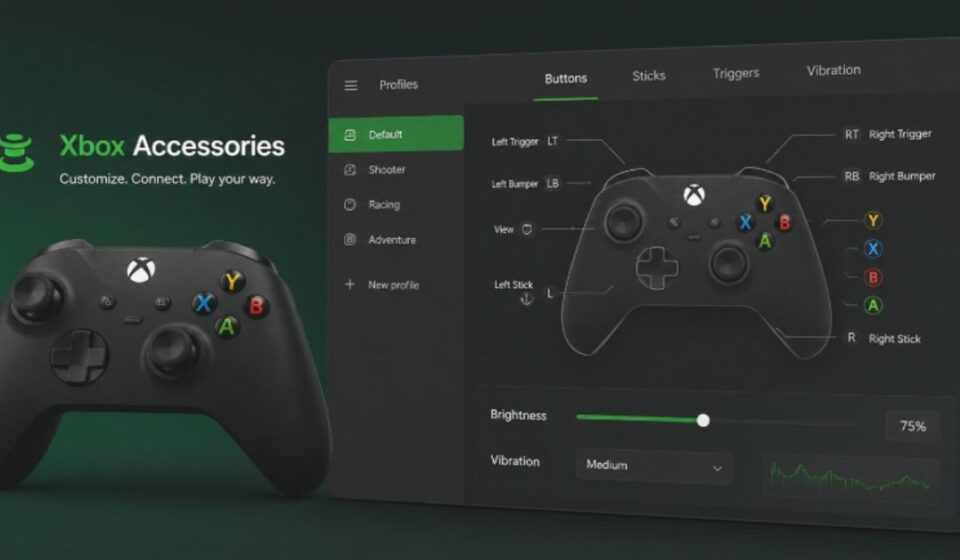

The Xbox Accessories App helps users customize supported Xbox controllers and accessories from a single platform. Instead of relying on default settings, players can personalize controls to match their gaming style and comfort level.
Modern games often require different control preferences. Some players prefer faster trigger responses, while others need custom button layouts for accessibility. The Xbox Accessories App provides tools that make these adjustments simple and organized.
Microsoft developed this application for Xbox users who want more control over their hardware. Whether you play on an Xbox console or a Windows PC, the app helps create a gaming experience that feels more personal and efficient.
What Is the Xbox Accessories App?
The Xbox Accessories App is an official Microsoft utility designed for managing compatible Xbox accessories. It allows users to customize controller behavior without changing any physical hardware components.
The app serves as a central hub for controller settings, profile management, and firmware updates. Instead of navigating multiple menus, users can access important customization tools from one location.
Its primary purpose is to improve usability and flexibility. Players can adjust supported settings based on their needs, making the gaming experience more comfortable and convenient.
Compatible Devices & Requirements
The Xbox Accessories App supports a variety of Microsoft gaming accessories. Compatible devices include Xbox Wireless Controllers, Xbox Elite Wireless Controller Series 1, Xbox Elite Wireless Controller Series 2, Xbox Adaptive Controller, and selected Xbox headsets.
Users can access the application on Xbox One, Xbox Series X, Xbox Series S, Windows 10, and Windows 11. A supported accessory must be connected correctly before the app can display available customization options.
Feature availability depends on the connected device. Standard Xbox controllers provide essential customization tools, while Elite controllers unlock advanced options such as trigger adjustments, thumbstick tuning, and multiple profile management.
Key Features
The Xbox Accessories App includes several tools that help players personalize their gaming setup. These features focus on customization, accessibility, performance management, and convenience.
Instead of forcing users to adapt to default controller settings, the app allows hardware to adapt to individual preferences. This flexibility can improve comfort during long gaming sessions.
The application also keeps settings organized and easy to access. Users can modify supported options without installing additional software or navigating complex menus.
Button Remapping
Button remapping allows users to assign different functions to supported controller buttons. This feature helps create custom control layouts, improve accessibility, and make frequently used actions easier to reach during gameplay.
Profile Management
Profile management enables users to save multiple controller configurations for different games or gaming styles. Players can switch between profiles quickly instead of manually adjusting settings whenever they play a different genre.
Firmware Updates
The Xbox Accessories App provides access to firmware updates for supported accessories. These updates can improve controller stability, enhance wireless performance, fix software-related issues, and maintain compatibility with newer Xbox features and system updates.
Thumbstick & Trigger Adjustments
Certain controllers allow users to adjust thumbstick sensitivity and trigger behavior. These settings help fine-tune responsiveness, giving players greater control over movement and actions in supported games.
Copilot Mode
Copilot Mode allows two controllers to function as a single input device. This feature helps experienced players assist beginners and supports users who benefit from shared control during gameplay.
Elite Series 2 Exclusive Features
The Xbox Elite Wireless Controller Series 2 includes advanced customization options such as adjustable trigger sensitivity, thumbstick tuning, paddle mapping, and multiple profile slots. These features provide a higher level of control for users who want deeper personalization.
How to Use the Xbox Accessories App
Using the Xbox Accessories App starts with connecting a supported accessory to your Xbox console or Windows PC. Once the device connects successfully, the application recognizes it and displays available settings.
Users can select the connected accessory and access customization tools from the main interface. The available options vary depending on the accessory model and its supported features.
A typical setup process includes:
- Connect a compatible accessory.
- Open the Xbox Accessories App.
- Select the detected device.
- Adjust available settings.
- Save a custom profile if needed.
- Test the changes during gameplay.
After saving preferences, users can return to the app anytime to make additional adjustments. This flexibility allows players to refine their setup over time as their gaming needs change.
Pros and Cons
The Xbox Accessories App offers several advantages:
- Official Microsoft application
- Easy-to-understand interface
- Controller customization tools
- Multiple profile support
- Firmware management features
- Accessibility-focused options
- Integration with Xbox hardware
Some limitations also exist:
- Advanced features depend on controller model
- Certain options are exclusive to Elite controllers
- Limited support for non-Xbox accessories
Common Problems & Fixes
Some users may encounter technical issues while using the Xbox Accessories App. These problems can affect controller detection, profile syncing, or firmware updates, which may prevent certain features from working correctly.
Most issues have simple solutions that do not require advanced troubleshooting. Checking the device connection, restarting the app, or updating software often helps restore normal functionality and improves the overall user experience.
Alternatives
The Xbox Accessories App provides useful customization tools, but some users may require additional features that are not available within the official software. This is especially true for players who use multiple controller brands or need advanced remapping options.
Several third-party applications offer alternative ways to manage controller settings and profiles. These tools focus on deeper customization, broader hardware support, and additional configuration options for different gaming setups.
Conclusion:
The Xbox Accessories App is easy to use and provides useful customization tools for supported Xbox accessories. Our team tested the app while exploring its features, which helped us better understand its functionality and user experience. Features like button remapping and profile management worked smoothly, while advanced settings added extra value for Elite controller users. Overall, the app remains a practical choice for most gamers and earns a rating of 8.5/10.
Read more topics on :Instamagazine.co.uk