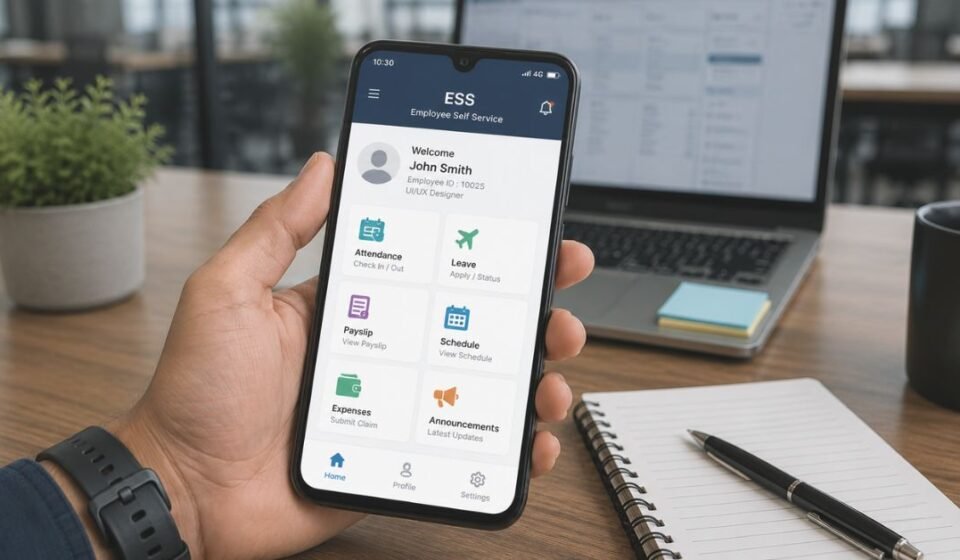

An ESS Mobile App lets employees handle daily work tasks from their phone instead of visiting the HR office. It covers attendance, leave, payslips, and schedules in one place.
This convenience has made ESS apps common across offices, factories, schools, and hospitals. Employees no longer wait for HR replies to check simple details.
What ESS Actually Means and Its Background
ESS stands for Employee Self Service. It refers to a system that gives employees direct access to their own HR-related data.
Earlier, employees depended on HR staff for every small request, such as checking leave balance or requesting a correction. This process was slow and created extra work for HR teams.
ESS mobile apps solved this by moving these functions onto a phone. Employees can now manage such tasks themselves within seconds.
How the ESS Mobile App Works
An ESS Mobile App connects to an organization’s HR or payroll system in the background. Employees log in using credentials provided by their employer.
Once logged in, the app pulls real-time data from the HR system and displays it on the employee’s screen. Any action taken, such as a leave request, gets sent to the system for review.
A supervisor or HR admin then approves or rejects that action from their end. The employee receives an update once a decision is made.
Types/Variants of ESS Mobile Apps
Not every ESS app is built the same way. Two broad categories exist based on how they are developed.
Generic ESS Apps
These apps are built to work with a specific HR software platform and can be used by multiple companies. Businesses connect the app to their own server without needing custom development.
Branded/Custom ESS Apps
These apps are designed and branded for one particular organization. They often include company-specific workflows and a matching visual design.
| Type | Built For | Customization Level |
| Generic ESS App | Multiple companies using the same HR platform | Limited |
| Branded/Custom ESS App | One specific organization | High |
Core Features of ESS Mobile App
ESS mobile apps combine several HR functions into a single tool. The exact features depend on the platform, but most apps share a common set.
Attendance and Time Tracking
Employees can clock in and out directly from the app. The system records these timestamps for payroll and attendance reports.
Leave and Absence Management
Employees can apply for leave and track its approval status. This removes the need for paper forms or manual emails.
Payroll and Payslip Access
Employees can view and download their payslips anytime. Salary history is also often available for reference.
Schedule and Shift Management
Upcoming shifts and schedule changes appear directly in the app. Some apps also allow shift swap requests between employees.
Expense and Mileage Claims
Employees can submit work-related expenses or travel mileage for reimbursement. Receipts can usually be attached as proof.
Supervisor Communication and Notifications
The app allows employees to send quick updates to supervisors, such as reporting a late arrival. Push notifications keep employees informed about approvals and reminders.
GPS and Location-Based Functionality
Many ESS apps use GPS to confirm an employee’s location during clock-in and clock-out. This helps employers verify that attendance is recorded from the correct worksite.
Some apps also allow employees to submit a correction if a punch was missed or recorded incorrectly. A supervisor then reviews and approves this correction before it updates the record.
Why ESS Mobile App Is Important for Employees
ESS apps give employees direct control over their own work information. This access builds trust, since employees can view their attendance, leave, and pay details whenever needed.
It also reduces confusion caused by delayed or missing information, making daily work life smoother overall.
Why ESS Mobile App Is Important for Organizations/Employers
Organizations benefit from ESS apps just as much as employees do, though in different ways.
Reduced HR Workload
HR staff spend less time answering repetitive queries since employees can check their own records. This allows them to focus on more strategic tasks.
Improved Data Accuracy and Compliance
Since employees enter their own data, the chances of manual errors go down. Digital records also make it easier to meet labor law documentation requirements.
Data Security and Privacy Concerns
ESS apps handle sensitive personal and financial data, which makes security an important factor.
Role-Based Access and Encryption
Most reliable ESS platforms restrict data access based on an employee’s role. Encryption is used to protect data during storage and transmission.
Location Tracking and Privacy Awareness
Since GPS tracking is common in these apps, employees should understand when and how their location is being recorded. Employers are expected to use this data only for attendance verification.
Common Issues Faced While Using ESS Mobile App
Like any software, ESS apps can face occasional problems during daily use.
- Login failures due to incorrect server details or expired credentials
- GPS not detecting location accurately in certain areas
- Delayed sync between the app and the HR system
- Approval delays when supervisors do not respond on time
Most of these issues are resolved by checking internet connectivity or contacting the HR/IT team.
Our team has personally used this app and faced a few of these issues firsthand. Based on that hands-on experience and advice we received along the way, the tips shared above reflect what actually worked for us.
Difference Between ESS Mobile App and Traditional HR Methods
Traditional HR methods relied on paper forms, in-person requests, and manual record-keeping. This process was time-consuming and prone to errors.
ESS mobile apps replace this with a digital system, where records update in real time. Employees also gain visibility into their own data, which paper-based systems never offered.
Future of ESS Mobile App and New Trends
ESS apps are likely to keep evolving alongside broader HR technology. As more companies shift toward digital workflows, self-service tools are expected to cover a wider range of daily HR tasks.
Improvements in app design and connectivity will also make these apps easier to use across different devices and network conditions. This growth will likely make ESS apps a bigger part of everyday work life.
Conclusion
An ESS Mobile App brings essential HR functions like attendance, leave, and payroll directly to an employee’s phone. It reduces dependency on HR staff while giving employees more control over their own information.
As organizations continue adopting digital HR tools, ESS mobile apps are likely to become a standard part of the workplace experience.
Disclaimer:
This article is for general informational purposes only and does not represent any official app, brand, or company. Features and functions may vary depending on the specific ESS platform your employer uses.
Read more topics on :Instamagazine.co.uk