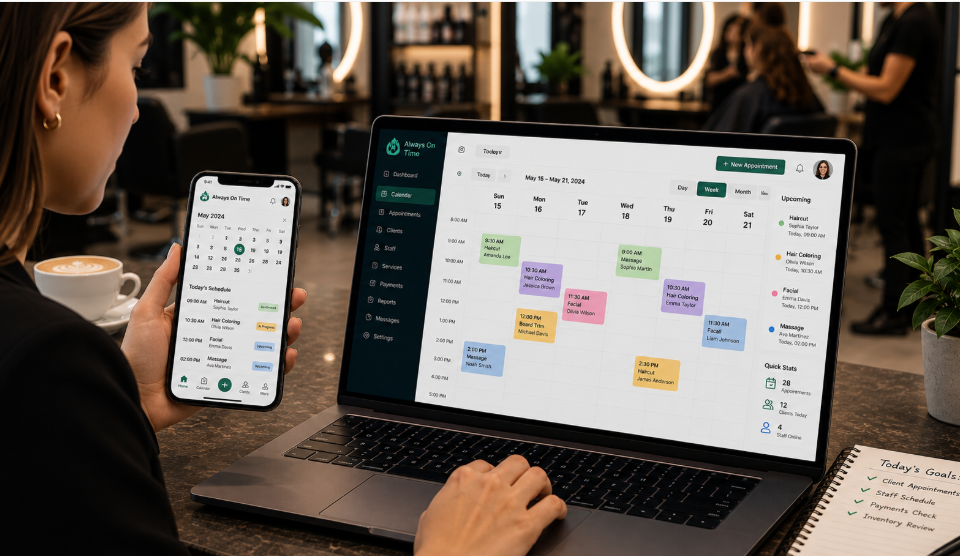

What is Always On Time App?
Always On Time (AOT) is a cloud-based scheduling platform built for service businesses. It combines a web system with a mobile app to manage bookings, staff, and payments in one place. Businesses use it to run daily operations without switching between multiple tools.
Who Is This App Made For
AOT serves service-based businesses that rely on appointments and staff schedules. Common users include:
- Salons and spas
- Yoga and fitness studios
- Personal trainers
- Clinics and healthcare providers
- Consulting firms
- Home care and support services
How This App Works
The system runs on two connected parts: a web dashboard for owners and a mobile app for staff. Owners manage bookings and schedules through the web system. Staff use the mobile app to check job lists, message clients, and update their status in real time.
Always On Time App Features
AOT bundles several tools into one platform, removing the need for separate booking, messaging, and payment apps.
Client Booking and Profiles
Businesses can create custom-branded profiles for their clients. Customers view open time slots, book appointments, and buy memberships directly from these profiles. This reduces phone calls and manual booking work.
Staff Scheduling Calendar
The calendar uses a drag-and-drop layout to assign shifts and appointments. Owners can move jobs between staff members instantly. This helps avoid double bookings and scheduling conflicts.
Messaging System
Staff and clients communicate directly through the app. The system logs every message, so owners can check when someone sent or viewed it. This keeps a clear record for every conversation.
GPS and Location Tracking
Field staff can view their next job location on a map. The app calculates the distance and provides directions once location access is turned on. This feature suits businesses with staff who travel between client sites.
Payment Processing
AOT includes built-in payment processing, so businesses can collect fees without a separate payment tool. Clients can pay when booking or after a service is completed. This keeps billing and scheduling in one system.
Automated Reminders
The app sends automatic reminders to clients before their appointments. These reminders go out through email or SMS. Fewer missed appointments mean steadier income for the business.
Membership Management
Businesses that offer recurring services can manage memberships through AOT. Clients can purchase, renew, or track their membership status from their profile. This suits studios and clinics with subscription-based models.
Reports and Analytics
Owners get reports on appointment trends, staff performance, and resource use. These reports help identify busy periods and staff who need support. Data-driven decisions become easier with this feature.
What Is a No-Code Platform
A no-code platform lets users build and customize a system without writing programming code. AOT falls into this category, since businesses can set up their booking pages, staff calendars, and client profiles through simple menus. This makes the platform accessible to owners without a technical background.
Duty Manager Emergency Call Feature
AOT includes a Duty Manager button inside the mobile app. Tapping it connects staff directly to the phone number saved for emergencies. This feature helps during urgent situations, such as last-minute cancellations or safety concerns during a job.
Does This App Work Without Internet
The mobile app needs a 3G or WiFi connection to log in and stay updated. Staff working in areas with weak signal may face trouble accessing job details or sending messages.
Why Does the App Have Different Developers Listed
App stores show two different developer names for AOT’s mobile app: Civica UK Limited and Malinko Health & Care Tech Ltd. This happens because Civica acquired Malinko in 2022, so some older app listings still show the previous company name.
Pricing and Plans
AOT offers a free version along with a free trial that does not require credit card details. Paid plans start around $49, based on third-party listings, though exact pricing may vary by business size and selected features. Businesses should confirm current pricing directly on the official AOT website before signing up.
Similar Named Apps – Clearing the Confusion
Several apps share the “Always On Time” name but serve different purposes. This causes confusion for people searching online.
| App Name | Purpose | Platform |
| Always On Time (AOT) | Business scheduling and client management | Web + Mobile |
| AlwaysOnTime | Staff job tracking companion app | Mobile only |
| Always On Time (Greeting App) | Sends personalized greetings to friends and family | Mobile/Facebook |
Anyone searching for the scheduling software should confirm they are downloading the correct app, since the names overlap closely.
Pros and Cons
| Pros | Cons |
| No-code setup, easy for non-technical owners | Different developer names cause confusion |
| Built-in payment processing | Requires internet to log in |
| GPS tracking for field staff | Mobile app has mixed reviews on some platforms |
| Free trial with no credit card needed | Pricing details vary across sources |
| Automated reminders reduce no-shows | Support quality may vary by region |
Comparison With Other Scheduling Apps
Always On Time vs Acuity
User reviews describe AOT as faster when handling large client lists compared to Acuity. One reviewer reported that Acuity took over two minutes to load a list of 4,000 clients, while AOT loaded the same size list within seconds. AOT also offers live chat support, whereas Acuity reportedly limits support to email.
Our team tested AOT directly before writing this guide, and this speed difference matched what we experienced firsthand.
Always On Time vs Calendly
Calendly focuses on simple appointment booking across many industries. AOT adds service-business tools like GPS tracking, payment processing, and membership management on top of booking.
User Reviews and Ratings
Reviews for the main AOT scheduling software are mostly positive, with users praising its ease of use and reliability. The companion mobile app for staff receives more mixed feedback, with some users reporting login and error message issues. Overall, the core platform earns stronger feedback than the mobile tracking app.
Conclusion
Always On Time App gives service businesses a single platform for bookings, staff scheduling, payments, and client communication. Its no-code setup and GPS tracking give it a practical edge for service businesses that need more than basic booking. Businesses should verify current pricing and confirm they choose the correct app, given the name overlap with unrelated apps.
FAQs
Why does Always On Time App show two different developer names?
Civica UK Limited acquired Malinko Health & Care Tech Ltd in 2022, so some app store listings still show the older company name.
Is Always On Time App the same as the AlwaysOnTime job-tracking app?
No, they are different products. Always On Time (AOT) is scheduling software for businesses, while AlwaysOnTime is a separate staff job-tracking app.
Does Always On Time App need an internet connection to work?
Yes, the mobile app requires a 3G or WiFi connection to log in and receive updates.
What is the Duty Manager feature in Always On Time App?
It is a button inside the mobile app that lets staff instantly call a saved emergency contact number, useful during urgent job situations.
Does Always On Time App require coding knowledge to set up?
No, it is a no-code platform, so businesses can configure bookings and calendars through simple menus without programming skills.
Can Always On Time App track staff location during a job?
Yes, the app shows the next job location on a map and provides directions once location access is turned on.
Disclaimer:
This article is for informational purposes only. Please verify the latest features, pricing, and details through the official website or other reliable sources.
Explore more related topics on :Instamagazine.co.uk