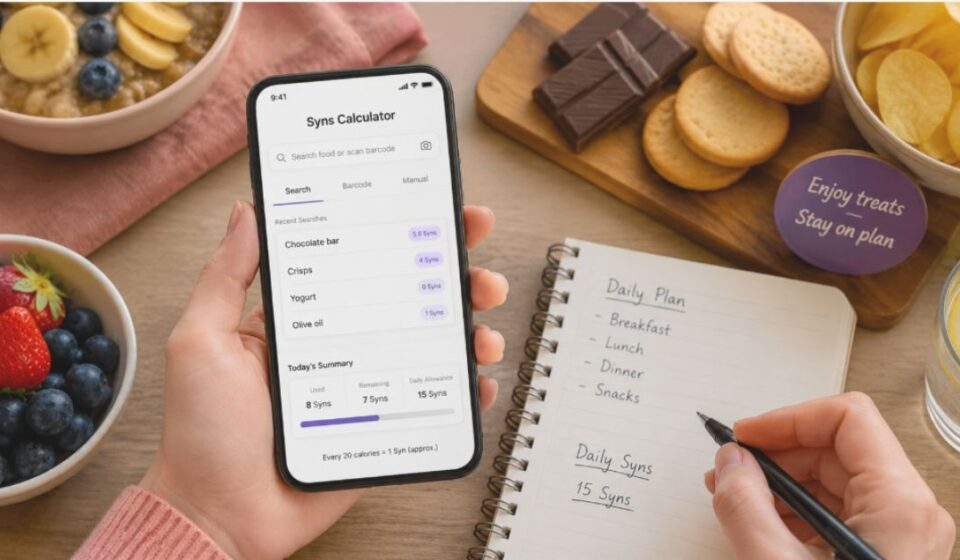

Tracking treats on Slimming World often confuses beginners more than any other part of the plan. A Syns Calculator App solves this by turning a complex system into a quick, reliable check. This guide breaks down everything you need to know about Syns, step by step.
What Are Syns?
Syns measure foods that fall outside Free Foods or Healthy Extras. These are usually items higher in calories, fat, or sugar, such as chocolate, crisps, or alcohol.
Each member gets a daily Syn limit and stays within it while eating freely from other food groups. This system lets people enjoy small treats without losing progress on their weight loss goals.
How a Syns Calculator App Works
Food Search Database
Most apps store a searchable list of common foods. Users type a food name, and the app returns its Syn value instantly. This works best for packaged or branded items already in the system.
Barcode Scanning Method
Many apps let users scan a barcode with their phone camera. The app matches it to the database and shows the Syn value right away. This is the fastest way to check packaged foods while shopping.
Manual Entry Method
When a food isn’t listed, users enter its nutrition details manually. The app then estimates a Syn value using a standard formula. This method suits homemade or less common foods.
How Syns Are Calculated
The 20 Calories = 1 Syn Rule
Most calculators build their estimate around calories. A common rule sets every 20 calories equal to 1 Syn. A 100-calorie snack, for instance, comes out to roughly 5 Syns.
Role of Fat Content in Syn Value
Some calculators also weigh in fat grams, not just calories. High-fat foods can score more Syns than low-fat foods with the same calorie count. This is why two similar-calorie snacks don’t always match in Syn value.
Difference Between Syns and Calories
Calories measure raw energy in food. Syns measure how that food fits inside the Slimming World plan, factoring in more than energy alone.
| Basis | Calories | Syns |
| Measures | Energy content | Plan-based food value |
| Considers fat | No | Often yes |
| Used for | General nutrition | Slimming World tracking |
| Daily limit | Varies by person | Fixed allowance |
Types of Syns Calculators
Official App-Based Calculator
Slimming World runs this calculator exclusively for paying members. It delivers the most accurate values through a detailed internal formula, plus extra tools like meal planning.
Third-Party Web Calculators
Independent websites offer these free tools without any membership. They lean on simplified formulas like the calorie-based estimate, useful for quick checks but not always exact.
Common Mistakes People Make While Calculating Syns
- Assuming equal-calorie snacks always carry equal Syns
- Ignoring fat content during manual calculations
- Guessing portion sizes instead of measuring them
- Applying packaged food values to homemade versions
- Mixing Free Food items into Syn totals by mistake
Why Calculating Syns in Homemade Meals Is Difficult
Mixing Free Foods with Non-Free Ingredients
Homemade meals often blend Free Foods with Syn-carrying ingredients. Calculators rarely separate the two on their own, so users must identify each Syn-worthy ingredient manually.
Calculating Per-Serving Syns
Cooks must divide a recipe’s total Syns by the number of servings it makes. Skipping this step inflates the Syn count per portion and throws off daily tracking.
Daily and Weekly Syns Allowance
Body weight and gender shape each person’s daily Syn limit.
| Group | Approximate Daily Allowance |
| Women | Around 15 Syns |
| Men up to 16 stone | Around 25 Syns |
| Men 16–20 stone | Around 30 Syns |
| Men over 20 stone | Up to 35 Syns (occasionally) |
When a Syns Calculator Result Can Be Inaccurate
- The food contains hidden fat the calculator never sees
- The ingredient brand differs from the one in the database
- Portion size gets estimated instead of weighed
- A recipe blends Free Foods with non-Free ingredients
- The calculator relies only on calories, ignoring fat data
Tips to Use Your Syns Smartly
- Weigh ingredients instead of guessing amounts
- Save higher Syns for treats you genuinely enjoy
- Cross-check with the official app when accuracy matters
- Keep a simple daily log to avoid overspending Syns
- Pair Syns with plenty of Free Foods each day
Frequently Asked Questions
Is there an app to check Syns?
Yes, Slimming World offers an official app for members to check Syn values.
How do I calculate Syns without the app?
Many people rely on the 20-calories-per-1-Syn estimate as a quick guide.
How many Syns are allowed per day?
It depends on gender and weight, generally ranging between 15 and 35 Syns.
Is there a free option for calculating Syns?
Yes, several third-party web calculators offer free Syn estimates.
Are Syns and Swips the same thing?
Slimming World has started using “Swips” as an updated name for Syns in its official app, though “Syns” remains the more commonly used term.
Do Syn values ever change for the same food?
Yes, if a brand changes its recipe or ingredients, the calorie and fat content shift, which can change the Syn value too.
Conclusion
A Syns Calculator App turns a tricky part of Slimming World into a simple daily habit. Once you understand how the formula works, tracking treats stops feeling like guesswork. Pair the right tool with a bit of consistency, and staying within your Syn allowance becomes second nature.
Disclaimer:
This article shares all the information we currently have, based on our team’s own hands-on experience using the app. Any details, features, or observations mentioned here reflect our genuine usage and testing, not official claims from Slimming World.
Explore more topics on :Instamagazine.co.uk