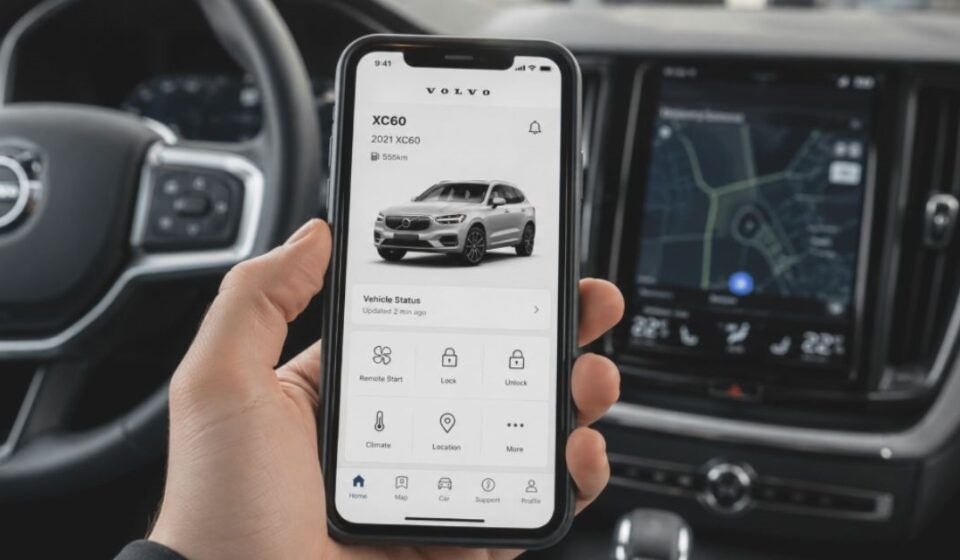

The Volvo App is the official mobile application from Volvo that lets owners remotely manage and monitor their vehicles from a smartphone. In this guide, you’ll learn how the app works, its key features, supported models, common issues, and everything else you need to know before using it.
What is Volvo App?
Volvo Cars built the Volvo App as its official mobile application for vehicle owners. It connects a driver’s smartphone directly to the car, allowing remote access to key functions.
The app works on both Android and iOS devices. It gives owners a digital bridge between their phone and their Volvo, making everyday car management simpler.
History and Evolution
Volvo originally launched the app as Volvo On Call, a basic remote-access tool for early connected models. Over time, Volvo rebuilt it into a more modern platform.
Today it carries the name Volvo Cars App. It now supports newer models like the EX30 and receives regular updates that improve design and performance.
Which Volvo Models and Devices Support the App
Compatibility depends on the model year and the type of infotainment system installed in the car. Newer Google-built-in models support the fullest range of features.
| Device/Model Type | Support Level |
| iPhone, iPad, Apple Watch | Fully supported |
| Android phones and tablets | Fully supported |
| Models from 2015 onward | Basic connected services |
| Models from 2018 onward | Extended subscription included |
| Sensus infotainment models | Subscription required for full features |
Core Features Explained One by One
The app brings together several practical tools in a single place, replacing tasks that once needed a physical key or a phone call to the dealership.
Remote Lock and Unlock
Owners can lock or unlock their car from their phone with a single tap. The app also sends a reminder if the car remains unlocked after parking.
Climate Pre-Control
Drivers can warm up or cool down the cabin before entering the vehicle. This feature works through the app regardless of where the driver stands.
Car Locator (Flash Lights / Horn)
In busy parking areas, the app can flash the headlights or sound the horn. This helps owners find their car quickly without extra searching.
Battery and Charging Insights
Electric and plug-in hybrid owners can check battery levels and estimated range. The app also shows nearby charging stations and tracks charging history.
Service Booking and Roadside Assistance
Owners can schedule a service appointment directly through the app. A dedicated button also connects drivers to roadside assistance in emergencies.
Working Mechanism
The app functions through a combination of user identity, secure pairing, and continuous data exchange between the car and Volvo’s servers.
Volvo ID and Account Sync
Every user creates a Volvo ID using their email address. An activation link or PIN verifies this ID before it becomes active.
Pairing Process With the Car
Pairing requires the driver to sit inside the car with both physical keys present. The driver then opens the ignition settings and confirms a matching code with the app.
Cloud and Real-Time Data Connection
Once paired, the app communicates with the car through Volvo’s cloud system. This connection delivers near real-time updates on status, location, and battery.
Volvo App vs Traditional Key Fob
A traditional key fob offers limited range and basic functions like locking and unlocking. The app extends these same actions far beyond the car’s physical range.
| Feature | Key Fob | Volvo App |
| Lock/Unlock range | Short distance | Works from anywhere |
| Climate control | Not available | Available remotely |
| Battery/fuel monitoring | Not available | Available in real time |
| Notifications | None | Alerts for lock status, charging, etc. |
| Service booking | Not possible | Built into the app |
Subscription, Plans and Renewal Policy
New Volvo vehicles from model year 2018 onward include several years of connected services at no extra cost. This covers most of the app’s remote features.
Once this included period ends, owners must renew the subscription to keep using remote functions. Renewal terms and pricing vary by market and vehicle model.
Privacy and Data Security
Signing in to the app requires two-factor authentication, meaning a one-time code reaches the registered email or phone number. This adds a layer of protection beyond a simple password.
Volvo also notes that data handling practices may vary based on the user’s region and how the app is used. Users can review these details directly within the app store listing before downloading.
Everyday Benefits in Daily Life
The app turns several small daily tasks into quick actions that owners can complete without physically approaching the car.
- No need to search for keys before leaving the house
- Cabin is ready before the driver even sits inside
- Charging and fuel levels are visible at a glance
- Service appointments can be booked in a few taps
- Help is one button away during roadside emergencies
Our team tested the app firsthand across daily routines, and the remote lock and climate control stood out as the most reliable features in regular use. Booking a service appointment through the app also felt noticeably faster than calling a dealership directly.
Common Issues and Their Solutions
Like most connected car apps, users occasionally face technical hiccups. Most of these link to login, connectivity, or app performance.
Login and Sign-In Issues
Some users report failed logins even with correct credentials. Reinstalling the app or resetting the password often resolves this problem.
Location or Connectivity Issues
The app may fail to detect the car’s location correctly when the vehicle is in use. This restriction usually protects safety rather than signaling a technical fault.
App Slow or Hanging Problems
Outdated app versions or older phone software can cause lag. Updating both the app and the phone’s operating system usually fixes this.
Difference Between Volvo Cars App and Internal Volvo App
Two separate applications share a similar name, and this often confuses users searching for the right one. Downloading the wrong app wastes time and adds no real value.
The Volvo Cars App serves customers who own a Volvo vehicle and want to manage it remotely. A separate internal Volvo App exists only for company employees. This second app handles internal communication and has no link to vehicle control features.
Future Upcoming Features and Updates
Volvo continues to release regular updates for the app, refining its design and adding support for new models as they launch. Recent versions focus on a cleaner layout and clearer vehicle status views.
Volvo is likely to keep this same direction going forward, shaping future updates around reliability and direct customer feedback.
Conclusion
The Volvo App has grown from a simple remote-access tool into a complete digital companion for Volvo owners. It combines convenience, safety, and control in one place.
Owners who understand its setup, features, and limitations get the most value from it. As Volvo keeps refining the app, it stands to remain a central part of the ownership experience.
Disclaimer:
This article is for general informational purposes only and is not affiliated with, endorsed by, or sponsored by Volvo Cars. Features, subscriptions, pricing, and availability may vary depending on your region, vehicle model, and software version.
Explore more topics on :Instamagazine.co.uk