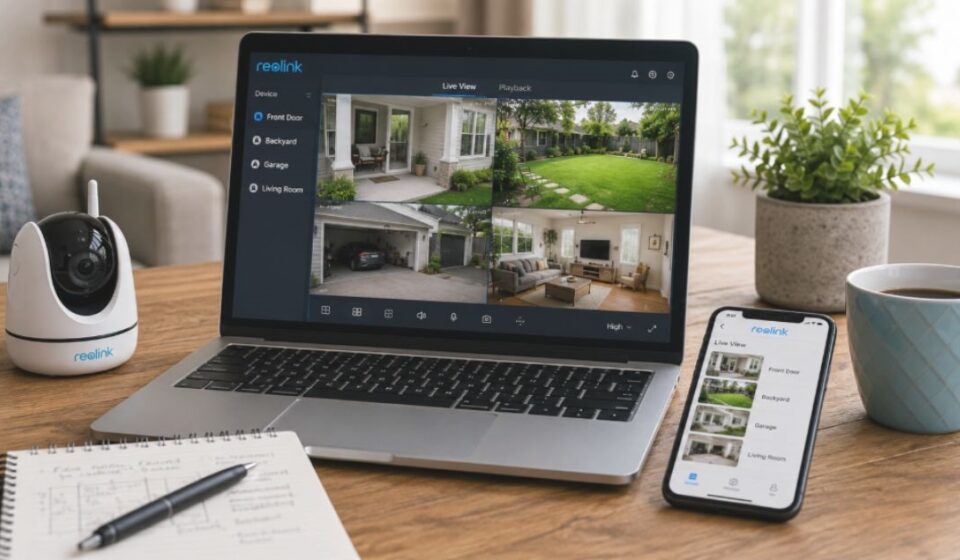

Security camera owners often struggle to understand what an app can actually do for them. The Reolink App solves this by giving users full control over their cameras from one screen. Many people also feel unsure about pricing, compatibility, and common glitches before they commit to a security system. This guide covers every feature, requirement, and common issue so you get a clear picture before you start using it.
What is Reolink App?
Reolink App is a surveillance app built for Reolink security cameras and NVR systems. It lets users view live footage, manage settings, and receive alerts from their phone. The app works on both Android and iOS devices, and it connects to cameras either over a local network or remotely through the internet.
Reolink App Key Features
Live View & Multi-Channel Viewing
Users can watch live footage from a single camera or view up to 16 channels at once. This helps property owners check every area without switching screens repeatedly.
Motion Detection & Smart Alerts
The app sends instant alerts when it detects movement. Users can set motion zones and adjust sensitivity to reduce false alarms from passing cars or trees.
Playback & Recording
Users can review recorded footage from an SD card or NVR hard drive directly in the app. They can also search recordings by time or event type to find specific moments quickly.
Two-Way Talk
Compatible cameras allow users to speak through the camera speaker. This feature works well for greeting visitors or warning off unwanted guests.
PTZ Camera Control
For pan-tilt-zoom cameras, the app allows remote control of camera direction. Users can move the camera left, right, up, or down without touching the device.
Device Sharing with Family
Users can share one camera with multiple family members through separate app logins. Each person can view the same feed at the same time, within the device’s user limit.
Firmware Update & Device Management
The app notifies users when a firmware update is available for their device. Updates can be installed directly through the app without extra tools.
Is Reolink App Free?
Free Features
The Reolink App itself is completely free to download and use. Core functions like live viewing, playback, and motion alerts do not require any payment.
Paid Features
Optional Reolink Cloud plans offer offsite video storage for an added layer of backup. These plans are not required for the app to function normally.
Reolink App System Requirements
Android/iOS Version Requirements
The app requires Android 8.0 or higher, or iOS 11.0 or higher. Older devices may not support the latest app version.
Compatible Devices (Camera/NVR/DVR)
The app only works with Reolink-branded cameras, NVRs, and DVRs. It is not designed to connect with other camera brands.
| Requirement | Minimum Version |
| Android | 8.0 |
| iOS | 11.0 |
| Supported Devices | Reolink cameras, NVRs, DVRs only |
Reolink App vs Other Security Apps
Most generic security apps support many camera brands but offer limited brand-specific features. Reolink App focuses only on Reolink devices, which allows deeper integration like firmware updates and device-specific alerts. This trade-off means less flexibility but a smoother experience for Reolink users.
| Feature | Reolink App | Generic Multi-Brand Apps |
| Brand Support | Reolink devices only | Multiple brands |
| Firmware Updates | Built into the app | Often not supported |
| Device-Specific Alerts | Yes | Limited |
| Setup Complexity | Low, since devices auto-detect | Varies by brand |
Pros and Cons of Reolink App
| Pros | Cons |
| Free to download and use | Playback timeline can be hard to fine-tune |
| Simple interface for beginners | Motion alerts can feel frequent at times |
| Supports multiple camera types | Works only with Reolink devices |
| Regular firmware updates | Live view may load slowly on weak networks |
| Local storage reduces extra cost | Some users report occasional connection drops |
Our team tested the Reolink App to understand its everyday performance and usability. The pros and cons below reflect our hands-on experience along with verified information from the app’s features and official documentation.
Common Problems & Fixes
Live View Not Loading
This usually happens due to a weak internet connection. Restarting the router or switching to a stronger network signal often resolves it.
Too Many/Too Few Notifications
Adjusting motion sensitivity and setting specific detection zones helps balance alert frequency. This prevents unnecessary alerts from unrelated movement.
Playback Slider Issue
Some users find it hard to jump to an exact time in recorded footage. Using the event search filter instead of the slider makes this easier.
Connection Drop Issue
Weak WiFi signal near the camera is the most common cause of dropped connections. Placing the router closer to the camera can improve stability.
Tips to Get the Best Experience from Reolink App
Placing cameras away from busy roads or moving trees improves alert accuracy from the start. Keeping the app updated ensures access to the latest bug fixes and features. For battery-powered cameras, lowering recording frequency helps extend battery life between charges. Connecting cameras to a stable WiFi network also improves both live view speed and alert reliability.
FAQs
Is Reolink App free?
Yes, and it does not force users into a subscription just to view or record footage.
Does Reolink require a monthly fee?
Only if a user chooses cloud storage. Local SD card or NVR storage already covers most users’ needs without any fee.
How do I connect Reolink to my phone?
The camera first joins the same local network as the phone. After that, the app can reach it remotely from anywhere using the device’s unique ID.
What app is used for Reolink CCTV cameras?
The Reolink App is the official app for all Reolink CCTV cameras and NVR systems.
Can multiple people use one Reolink account?
Yes, though the exact number of people who can view at the same time depends on the camera model.
Conclusion
The Reolink App offers a complete, beginner-friendly way to manage Reolink security devices from anywhere. While it has small usability issues in playback and notifications, its free core features and steady updates make it a reliable choice. Understanding its requirements and limitations beforehand helps users get the most out of their security setup. With the right network setup and a few basic settings adjusted, most common issues can be avoided entirely.
Disclaimer:
This article is for informational purposes only. Features, system requirements, and pricing may change over time, so always check the official Reolink resources for the latest information.
Read more topics on :Instamagazine.co.uk